Rate Overrides (Client, Project & Role)
Pay a different base rate or use different cost codes for one client, project or role without duplicating the pay rate document
What This Feature Does
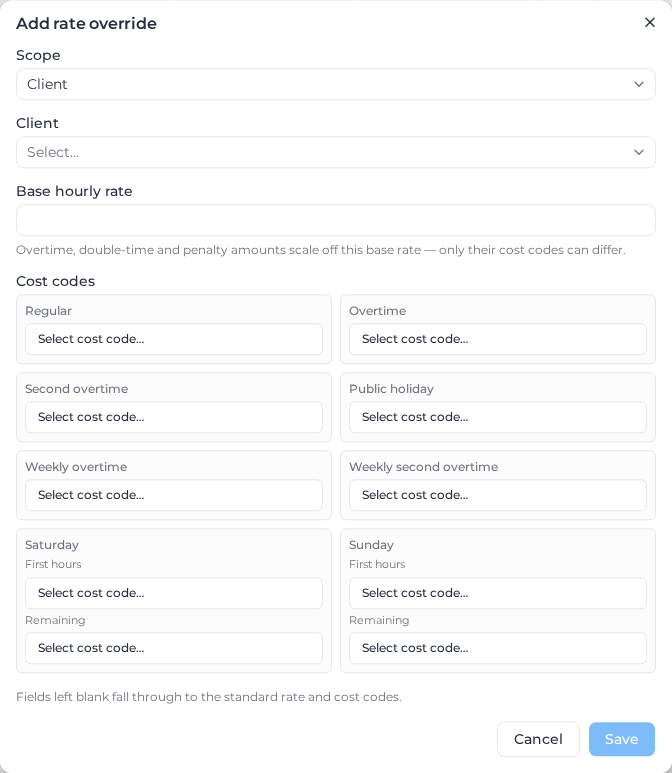
Rate Overrides let a single pay rate document pay a different base hourly rate — or code hours to different cost codes — for one specific client, project, or role. The override sits directly on a rate bucket (a leaf classification in the rate tree) alongside its standard rate.
Before this, the only way to charge one client a higher site rate was to duplicate the entire pay rate document and scope the copy to that client. The only way to pay one role differently was to duplicate the document or restructure the tree into Employment Type → Role. Overrides remove both needs.
The role scope is only available when your tree has no Role level. If the tree is role-based, or Employment Type → Role, the role dimension is already expressed by the tree itself — price the role with its own branch. The role option is hidden in that case, and rejected if requested another way.
Why This Matters
Duplicating a document to serve one client splits a worker's week across two documents. Weekly rules — weekly overtime thresholds, RDO accrual, fortnightly and weekly hour-threshold allowances — are designed around one worker's whole week, and a split week is a harder problem: Pay does aggregate across documents, but that path carries accepted trade-offs (sibling leave hours don't seed another document's weekly overtime threshold, and a week split across three or more documents may not contribute to weekly RDO at all).
Keeping the week in one document sidesteps all of that. The worker's hours accumulate normally, weekly rules run once, and only the base rate and coding differ per client or project.
What Can Be Overridden
The same fields for every scope:
| Overridable | Not overridable |
|---|---|
| Base hourly rate | Overtime / double-time dollar amounts |
| Regular cost code | Penalty (weekend, public holiday) dollar amounts |
| Overtime cost code | Casual loading, night rates |
| Second overtime (double-time) cost code | Allowances, thresholds, rules of any kind |
| Public holiday cost code | Shift rates |
| Weekly overtime cost code | RDO, time-of-day and custom-rule cost codes |
| Weekly second overtime cost code | Monday–Friday day-rule cost codes |
| Saturday cost code (first hours + remaining) | |
| Sunday cost code (first hours + remaining) |
Overtime and penalty amounts are deliberately absent, and don't need to be there. Pay derives them from the base rate multiplied by the rule group's multipliers. Override the base rate and every overtime, double-time and penalty amount for that client scales with it automatically. Only the cost codes differ per client, which is the "same work, different coding structure" case.
Rules always stay on the rule group. Overtime thresholds, allowances, RDO accrual and every other rule are maintained in one place and shared by every client using that bucket. This is what keeps weekly rules correct.
How Overrides Are Applied
When a timesheet is processed, Pay matches it to a rate bucket as usual, then layers any matching overrides over that bucket's standard rates:
- Standard — the bucket's own rate and cost codes.
- Role override — applied if the timesheet's role matches.
- Client override — applied on top, if the timesheet's client matches.
- Project override — applied on top of that, if the timesheet's project matches.
Overrides layer, field by field; the last contributor in that order wins on each field. A project override that only changes a cost code keeps the client's rate uplift. A client override that only changes the coding keeps the role's rate. Anything no override sets falls through to the standard value.
Why role goes first, not last. Role and client/project are different questions — role is who is working, client/project is what work. The rule this order encodes is "AGL work is coded the AGL way regardless of role": a client or project override wins on any field it sets, and the role override supplies the rest. Putting the role last would let a role override silently re-code that client's work.
Example
A bucket pays $45/hr and codes regular hours to LAB-100.
| Configuration | Client AGL, Project Site X, role Haulage pays | Coded to |
|---|---|---|
| No overrides | $45/hr | LAB-100 |
| Client AGL: $65/hr | $65/hr | LAB-100 |
Client AGL: $65/hr, plus Project Site X: code AGL-SITEX | $65/hr | AGL-SITEX |
| Project Site X: $70/hr only | $70/hr | LAB-100 |
| Role Haulage: $55/hr | $55/hr | LAB-100 |
Role Haulage: $55/hr, plus Client AGL: code AGL-100 only | $55/hr | AGL-100 |
| Role Haulage: $55/hr, plus Client AGL: $65/hr | $65/hr | LAB-100 |
Overtime on the third row is $65 × the rule group's overtime multiplier — no separate overtime override needed. A timesheet worked in any other role falls straight through to the standard rate and codes.
Adding an Override
- Open the pay rate document and go to the Rate Tree tab.
- Expand the classification (rate bucket) you want to override.
- In Rate overrides, choose Add override.
- Pick Client, Project or Role, then select the specific one. (Role only appears when the tree has no Role level.)
- Enter a base hourly rate, and/or pick cost codes for the rate cards that should differ.
- Save.
Leave any field blank to inherit the standard value. An override must set at least one thing — a rate or a cost code — before it can be saved; an override that sets nothing has no effect on pay but would still occupy that client's slot.
Editing and removing
Use the pencil icon on an override row to edit it. The editor always saves its complete state, so clearing a field returns it to inheriting the standard value.
To stop overriding a client, project or role entirely, use the remove (trash) icon. Removing is the only way to return an entity fully to the standard rate — an override cannot be "emptied".
If the tree later gains a Role level
Restructuring a document's tree to add a Role level removes its role overrides, and the confirmation names what it removed. The tree now expresses the role dimension itself, so the override could never apply again — price the role with its own branch instead. Client and project overrides are unaffected.
Role overrides that predate the restructure, or that were added to a role-bearing document some other way, are shown flagged Inactive: Pay ignores them and every timesheet pays the bucket's standard rate. You can remove them (removing is always allowed) but not add or edit them.
Interaction With Other Features
Higher Duty
When Higher Duty Settings re-code a day's timesheets onto a higher-paying role, each timesheet keeps its own client/project override. A timesheet on Client X re-coded to the supervisor bucket is paid at the supervisor rate for Client X, not at whatever rate the client whose hours triggered the higher duty happens to have.
The role override behaves the opposite way, deliberately: the day is being paid at the higher duty role's rate, so it picks up that role's override, not the role each timesheet was originally worked in. Higher duty must never reduce pay, and re-resolving to each timesheet's own role would drop the higher-duty role's uplift.
This makes a role override on a higher-duty role wider than it looks. On any day that role meets its threshold, the whole day's timesheets are paid at the overridden rate — not just the hours worked in that role. The override editor warns you when the role you've picked is one Higher Duty is configured for.
Removing dollar rates (quantity-only coding)
Clearing a bucket's dollar rates for quantity-only coding also strips the dollar rate from every override on that bucket, so overridden clients genuinely pay $0 rather than keeping their overridden rate. Cost-code overrides are preserved, so quantities still carry the client's coding. An override that carried only a dollar rate is removed entirely — and the confirmation names which overrides that removed, so nothing disappears silently.
Once a bucket has been cleared this way, an override on it cannot set a base rate — that would put dollar pay back on a bucket you deliberately zeroed. Override its cost codes instead, or restore the bucket's dollar rates first.
This is a change, and it applies to client and project overrides too — not just role. Setting a base rate in a client or project override on a quantity-only bucket used to be allowed and now returns an error. Existing overrides are untouched; only new edits are refused. If your team sets rates on cleared buckets today, that edit will stop working — use cost-code overrides, or restore the bucket's dollar rates first.
Manual pay-line entry
When a timesheet is coded manually, the rate box prefills — and the cost-code picker offers — the effective rate and codes for that timesheet's client, project and role, not the standard rate card. If the timesheet's role was corrected on the Pay side, the corrected role's override is the one used.
Milo
Milo can read and write overrides conversationally, for example:
Set a client rate override of $65/hr for AGL on the CW3 bucket
Code AGL's Saturday first hours to AGL-SAT1 on CW3
Remove the project rate override for Site X on CW3
Set a role rate override of $55/hr for Haulage on the Full Time bucket
Milo refuses a role override on a document whose tree has a Role level, and says why.
Audit Trail
An applied override is recorded in the timesheet's match details, naming the scope, the client or project, and the effective base rate. A rate that differs from the document's rate card is therefore always explainable — you can tell an override apart from a mis-match or a worker pay-item override.
Limitations
- Shift-priced buckets. Hours priced by Shift Rules are paid from shift rate amounts directly, not from the base rate × a multiplier. Overriding the base rate on such a bucket has no effect on pay. Don't use overrides for shift-priced work.
- No effective dating. An override applies to every timesheet processed against the document, including reprocessing of earlier periods. Adding an override and then reprocessing last month will repay that month at the new rate. If a rate change needs a start date, use the document's own effective dating instead.
- One override per entity per bucket. A client can be overridden once on a given bucket. To vary further within that client, add a project override, which layers on top.
- The role scope needs a tree with no Role level. On a role-based (or Employment Type → Role) tree the role override is neither offered nor applied — give the role its own branch instead. Restructuring a tree to add a Role level removes the role overrides it had.
- A cleared bucket can't carry an override base rate. Once a bucket's dollar rates are removed for quantity-only coding, overrides on it can set cost codes but not a rate.
- Leave is treated like worked time. A leave timesheet resolves overrides the same way a worked one does, so an overridden role or client rate applies to leave against that role or client too.
Best Practices
- Reach for an override before duplicating a document. One document per award, with overrides for client and role variation, keeps weekly rules correct. This is the whole point: a worker whose week spans two roles (or two clients) stays in one document, so the weekly overtime threshold is counted once and weekly RDO accrues once.
- Override the base rate, not the coding, when only the money differs — and only the coding when only the coding differs. Fields left blank inherit, which keeps the override honest about its intent.
- Use a project override for a variation within a client, so the client-wide uplift is maintained in one place and layers automatically.
- Check the effective rate on a processed timesheet after adding an override. The match details name the applied override and the resulting base rate.