

Handle failed inspections
Mark an inspection point failed, record the defect or non-conformance, and close it out with a rework, accept-as-is or reject disposition.
When a point doesn't meet its acceptance criteria, you mark it failed instead of skipping it. That opens a defect (a non-conformance, or NCR) on the row. The defect must be closed with a disposition before the workpack can be closed out, so the closeout record shows every failure and how it was resolved.
Anyone who can sign off the row can mark it failed and close its defect.
Mark a point failed
- On the execution screen, click Mark failed on the row. It is there on any row not yet done.
- Confirm with Mark failed.
The row changes to Failed and the message "Activity marked failed — a defect was opened." appears.
If the row has a form linked to open When the row is marked failed, it appears on the row: use it to record what was found, with photos and measurements. The workpack's Default defect form adds such a form to every row. Without a form you can still close the defect; the form is where the evidence goes.
Close out the defect
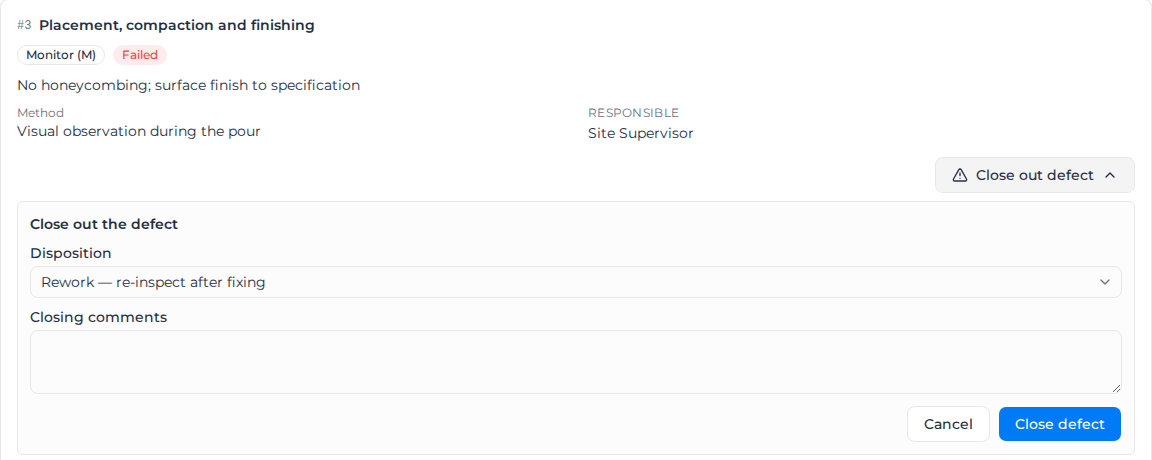
- On the failed row, click Close out defect.
- Choose the Disposition:
- Rework — re-inspect after fixing: the work is fixed and inspected again. The row goes back to In progress so it can be signed off or failed again.
- Accept as-is (signed concession): the work is accepted as built. The row becomes Accepted as-is and counts as done.
- Reject — replace or mark N/A: the work is rejected. The row stays Failed so a manager can mark it N/A or deal with it outside the workpack.
- Enter Closing comments of at least 10 characters. Shorter comments show "Add a closing comment (at least 10 characters)."
- For Accept as-is, sign in the Concession signature box. It is required.
- Click Close defect.
A closed defect can't be edited. If the same row fails again after rework, a new defect is opened, so each failure keeps its own record. Every step is in the workpack's audit trail.
On safety documents
On a SWMS, JSA or toolbox talk the same action is called Cannot comply, and confirming it with Raise an issue opens the defect. It is closed out the same way.
Related pages
- Sign off on site
- Close out a workpack
- Build a form: build the defect or NCR form the row opens.