

Shift spacing rules
Pay a penalty rate when a worker starts a shift before they have had a long enough break since the last one.
A shift spacing rule pays a penalty rate when the break between two shifts is too short, for example double time when a worker comes back within 10 hours of finishing.
Shift spacing rules belong to a rule group: open the pay rate document, select the Rule Groups tab, and find Shift Spacing Rules.
Add a shift spacing rule
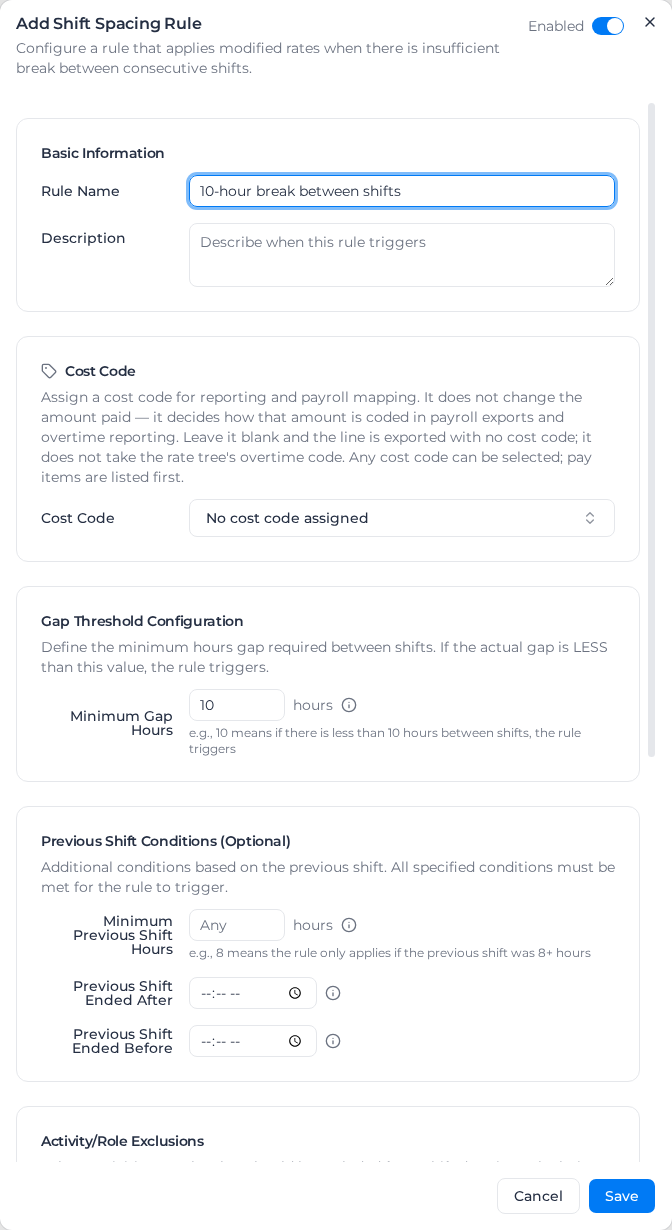
- Under Shift Spacing Rules, select Add Shift Spacing Rule.
- Leave Enabled on at the top of the dialog.
- Enter a Rule Name and optionally a Description.
- Choose a Cost Code for the penalty line. It doesn't change the amount, but it decides how the penalty is coded in exports. With none, the line is exported with no cost code (shown as
-), not with the classification's overtime code. - Enter the Minimum Gap Hours. The rule applies when the gap between the end of one shift and the start of the next is less than this.
- Optionally set conditions on the previous shift and exclusions (below).
- Under Rate Modification, choose the Rate Type, Multiplier or Fixed Rate, and enter the value, such as a Multiplier Value of 2.
- Choose whether to Apply to Entire Shift (see below).
- Select Save.
To change or remove a rule, open its menu and select Edit or Delete.
Which hours get the penalty
- With Apply to Entire Shift on, every hour of the next shift is paid at the penalty rate.
- With it off, only as many hours as the gap was short get the penalty, and the rest of the shift is paid normally. With a 10-hour minimum and an 8-hour gap, 2 hours are paid at the penalty rate.
If more than one rule matches, the first one in the list is used.
Conditions
Under Previous Shift Conditions (Optional), every condition you set must be met:
- Minimum Previous Shift Hours: the previous shift must have been at least this long. Leave it at Any for no minimum.
- Previous Shift Ended After and Previous Shift Ended Before: the previous shift must have ended after or before a time of day.
Under Activity/Role Exclusions, Exclude Activities and Exclude Roles leave activities (such as travel) or shifts in some roles out of the previous shift's hours.
Under Client/Project Conditions, turn on Same Client or Same Project to apply the rule only when both shifts are for the same client or project.
An uncoded penalty line is still labelled with the rule's name in the Summary View and calendar. In an export, add the Shift Rule column, which is off by default, to tell these lines apart from other lines with no cost code; the Pay Item column shows - for all of them.
Penalty lines on older timesheets can show the overtime cost code, because uncoded penalties used to take it. They keep it until you apply pay rates again. If your payroll system maps lines by cost code, give the rule a cost code before you do, or the penalties will arrive with no code.
Example
A rule with Minimum Gap Hours 10, a Multiplier Value of 2 and Apply to Entire Shift on. A worker finishes at 10 pm and starts again at 6 am, an 8-hour gap. The whole 6 am shift is paid at double time. With Apply to Entire Shift off, 2 of its hours would be.