

Fortnightly overtime rules
Pay overtime once a worker passes a number of hours across a fortnight, such as time and a half after 76 hours.
A fortnightly overtime rule pays overtime once a worker's hours across two payroll weeks pass a threshold, for example time and a half after 76 hours. It runs after daily and weekly overtime, and only changes hours that are still ordinary time. Hours already paid as overtime, at a weekend or public holiday rate, by a shift rule, as an RDO or as a minimum engagement top-up keep their pay.
Fortnightly overtime rules belong to a rule group: open the pay rate document, select the Rule Groups tab, and find Fortnightly Thresholds.
Before you start: set the fortnight
The fortnight comes from your payroll cycle:
| Payroll cycle | Fortnight used |
|---|---|
| Fortnightly | The pay period |
| Four Weekly | Weeks 1 and 2, then weeks 3 and 4, of each pay period |
| Weekly with a Fortnightly Anchor Date | Every 14 days from the anchor date, across two weekly pay runs |
| Monthly or Twice a Month | Every 14 days on the account's week grid, running on across pay periods |
| Weekly with no anchor date | None: fortnightly overtime rules are skipped, and the timesheet's rate details say so |
On a weekly cycle, set the Fortnightly Anchor Date (optional) before you add a fortnightly rule.
Add a fortnightly overtime rule
- Under Fortnightly Thresholds, select Add Rule.
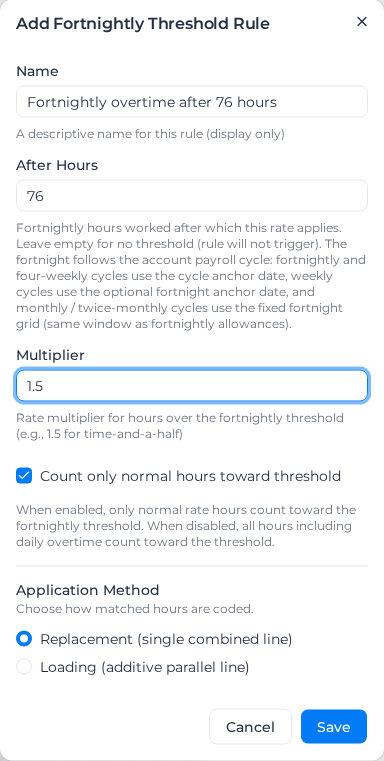
- Enter a Name, such as "Fortnightly overtime after 76 hours". The name is only a label.
- Enter After Hours: the hours in the fortnight after which the rule pays. Left empty, the rule never pays.
- Enter the Multiplier, such as 1.5.
- Leave Count only normal hours toward threshold on, or turn it off to count every worked hour (see below).
- Choose the Application Method: Replacement (single combined line) pays the hours at the base rate times the multiplier; Loading (additive parallel line) keeps them at the base rate and adds a line for the premium, with a Loading Rate (% of base) and a Loading Cost Code.
- Select Save.
The rule is switched on when it is saved. Each rule in the list has a switch to turn it off and a pencil to edit it. A Loading rule also shows its loading rate and cost code, such as "Loading: 50% → OT-LOAD", and its multiplier is dimmed because it doesn't set what the hours pay.
Two tiers
A rule group can hold two fortnightly rules, for example 1.5x after 76 hours and 2x after 86. The lower threshold is always the first tier. Two rules can't share a threshold: saving one is refused with "A two-week threshold rule already exists at 76h … Use a different threshold, or edit/delete the existing rule."
Count only normal hours toward threshold is read from the first tier. Turning the first tier off, or clearing its After Hours, keeps its settings but makes the other rule the first tier, and that rule's own Count only normal hours toward threshold is used instead. Check it before you do either. Both are better than deleting a rule you may want back.
Choose which hours count
- Count only normal hours toward threshold on (the default): only ordinary-rate hours count. Daily and weekly overtime don't. Weekend, public holiday, shift-rule and time-of-day hours still count and keep their own rate.
- Off: every worked hour counts, overtime included.
The second tier always counts ordinary hours plus the first tier of daily overtime.
Within each fortnight, the first week starts from zero and the second week adds on to the first, so a threshold crossed in the second week is paid at the right point even though weeks are processed one at a time.
With a weekly threshold as well
In the default counting mode, hours already paid as weekly overtime don't count toward the fortnightly threshold. So with weekly overtime after 38 hours, a normal fortnight tops out at 76 ordinary hours, and a fortnightly threshold of 76 or more is rarely reached. Set it lower, or turn Count only normal hours toward threshold off on the fortnightly rule.
Some hours the weekly rule leaves out still count toward the fortnight: weekend and public holiday hours taken out by Exclude weekend and public holiday hours from the threshold, weekend and public holiday hours paid by a day rule, hours on a day whose day rule has Counts toward weekly overtime threshold off (see Leave one day out of the count), paid leave within a worked day, and hours a shift rule holds out of overtime. On a document that uses any of these, a 76-hour fortnightly threshold can still be reached.
Examples
Overtime after 76 hours. A fortnightly payroll cycle, and a rule at 76 hours and 1.5x counting normal hours only. A worker does 40 ordinary hours in each week. Week 1 is all ordinary time. In week 2 the fortnight passes 76 hours on Friday, and the last 4 hours are paid as fortnightly overtime.
Counting all hours. Daily overtime after 8 hours at 1.5x, and a fortnightly rule at 76 hours with Count only normal hours toward threshold off. A worker does 10-hour days. Every hour counts, so the threshold is reached sooner; the daily overtime keeps its daily rate and only ordinary hours after that point become fortnightly overtime.
After you change a rule
The second week reads the first week's hours when it is processed. If you change or re-apply week 1 after week 2 was processed, apply pay rates to week 2 again.
When a rule group has a fortnightly rule, the Rate Tree tab shows Fortnightly Overtime and Fortnightly Second Overtime cost code tiles. Without their own codes, those hours use the classification's Overtime and Second Overtime codes. See Link cost codes.