

Leave loading
Pay a leave loading, such as 17.5% annual leave loading, on its own coded line beside the leave.
Leave loading pays a loading on paid leave as a separate line with its own cost code, so your payroll system receives it as its own item. With a 17.5% annual leave loading on a $50 base, the pay lines show "Annual Leave 7.6h @ $50.00" and "Annual Leave Loading 7.6h @ $8.75" instead of one line at $58.75.
Leave loading is set on a leave rule, and only on a paid one.
Turn on leave loading
- Open the pay rate document, select the Rule Groups tab, and find Leave Rules.
- Select Add Leave Rule, or open the menu beside a paid leave rule and select Edit.
- Under Application Method, choose Loading (additive parallel line).
- Enter the Loading Rate (% of base), such as 17.5.
- Choose the Loading Cost Code for the loading line.
- Leave the Rate Multiplier at 1 (see below).
- Save the rule.
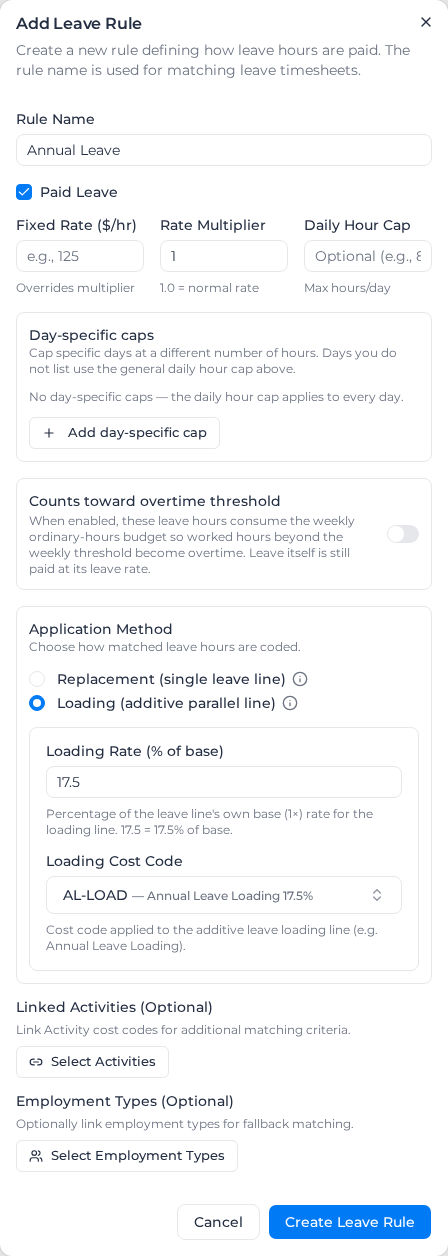
The rule then shows "Loading 17.5%" and the loading cost code in the list. Switching the rule back to Replacement (single leave line) clears the loading rate and cost code.
If your rule already includes the loading in its multiplier, such as 1.175, set the multiplier back to 1 when you switch to Loading. Loading only adds the loading line; it doesn't reprice the leave line, so a 1.175 multiplier plus a 17.5% loading pays the loading twice. The dialog warns you when Loading is chosen with a multiplier above 1.
How the loading is worked out
The loading is a percentage of the leave line's own base rate:
- leave at the worker's base rate: the loading is that rate times the loading percentage;
- leave at a Fixed Rate ($/hr): the loading is a percentage of the fixed rate;
- leave with a multiplier above 1: the loading is a percentage of the ordinary rate, not the multiplied one;
- leave with a multiplier below 1, such as half pay at 0.5: the loading is a percentage of the reduced rate the leave pays.
The leave hours are counted once; the loading line doesn't add to the hours reported. With a Daily Hour Cap, only the hours the cap pays get the loading.
Which hours get a loading
- Paid leave on its own leave timesheet (from a leave request, or a timesheet matched to the leave rule's name or role): yes.
- Leave entered as a line on a worked timesheet: no, it is paid like worked time. Record leave on its own leave timesheet for the loading to apply.
- Unpaid leave, and leave that matches no rule: no.
- Worked hours: no, see Worked hours loading.
Counts toward weekly overtime threshold and Counts toward daily overtime threshold on the leave rule don't change the loading.
If the rule's Cost Code Source is Each classification (rate tree), each classification can code the loading line to its own code on the Rate Tree tab, and the Loading pay item is the code used where a classification has none. See Code leave to each classification.
Example
Annual leave at a $50 base with a 17.5% loading. A worker takes a 7.6-hour annual leave day:
- Annual Leave, 7.6 hours at $50.00: $380.00
- Annual Leave Loading (17.5%), 7.6 hours at $8.75: $66.50
Choose a loading cost code with a description: exports take the line's cost code name from it. A change applies the next time pay rates are applied; apply pay rates again for leave already processed.