

Cost code threshold rules
Code hours to a different cost code once a worker passes a number of hours in the pay period, without changing their pay.
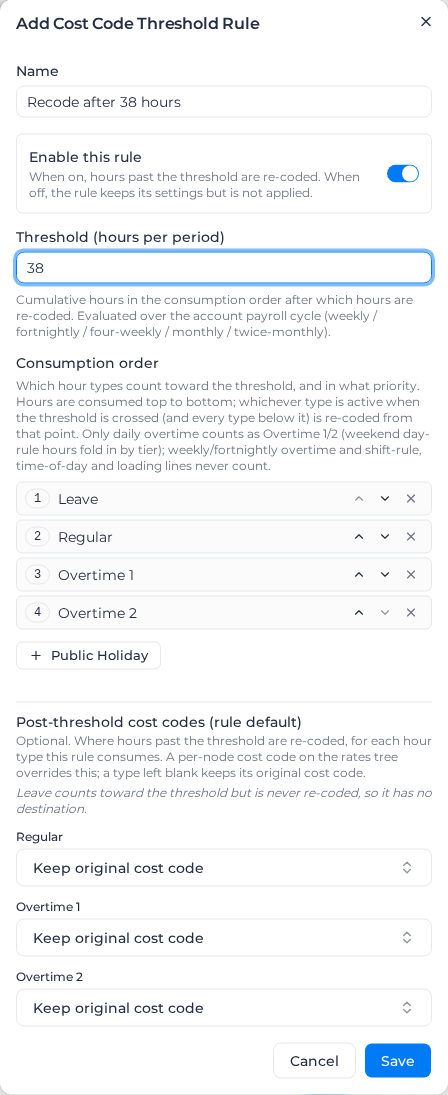
A cost code threshold rule changes the cost code on a worker's hours once they pass a number of hours in the pay period, for example ordinary hours on one code up to 38 hours and on another code after that. What the worker is paid doesn't change, only how the hours are coded.
Cost code threshold rules belong to a rule group: open the pay rate document, select the Rule Groups tab, and find Cost Code Threshold Rules.
Add a cost code threshold rule
- Under Cost Code Threshold Rules, select Add Rule.
- Enter a Name, such as "Recode after 38 hours".
- Leave Enable this rule on. Turned off, the rule keeps its settings but doesn't change any hours.
- Enter the Threshold (hours per period).
- Under Consumption order, keep the hour types that count toward the threshold and put them in order with the arrows. Remove a type with its cross, or add one back with its button, such as Public Holiday.
- Under Post-threshold cost codes (rule default), choose the cost code each hour type moves to after the threshold, or leave Keep original cost code.
- Select Save.
Each rule in the list has a switch to turn it off and a pencil to edit it.
How the threshold is counted
- The threshold covers the whole pay period of your payroll cycle: a week, fortnight, four weeks, month or half month. It doesn't restart each week of a longer period.
- Hours count in the Consumption order, top to bottom. The hour type being counted when the threshold is reached, and every type below it, change cost code from that point.
- The hour types are Leave, Regular, Overtime 1, Overtime 2 and Public Holiday.
- Regular includes ordinary hours paid at a loaded rate by a shift rule or time-of-day rate.
- Overtime 1 and Overtime 2 include overtime from daily, weekly and fortnightly thresholds. Saturday and Sunday day-rule hours count as Overtime 1 for the first hours and Overtime 2 for the rest.
- Loading lines that only mirror hours already counted, such as a casual loading on the same hours, aren't counted again. Nor are RDO, minimum engagement and custom activity lines.
- Timesheets that are manually coded or under review count toward the threshold, but their cost codes aren't changed.
- Leave can count toward the threshold but never changes cost code, so it has no cost code to choose.
Give each classification its own cost code
On the Rate Tree tab, each classification has a Cost code thresholds section with a Primary (before threshold) and a Secondary (after threshold) code for each hour type. Primary is the classification's existing code and isn't changed there. Set Secondary to override the rule's default for that classification. With neither set, hours after the threshold keep the primary cost code.
After you apply pay rates, check the cost codes on the pay lines for the period.