

Shift rules
Pay different rates depending on when a shift starts or finishes, for hours worked in a time window, or for a day worked mostly in a time window, such as night shift.
A shift rule pays a shift, or part of it, at different rates depending on when it is worked. For example, a night shift starting after 18:00 might pay its first 2 hours at 1.25x and the rest at 1.5x.
Shift rules belong to a rule group: open the pay rate document, select the Rule Groups tab, and find Shift Rules.
Add a shift rule
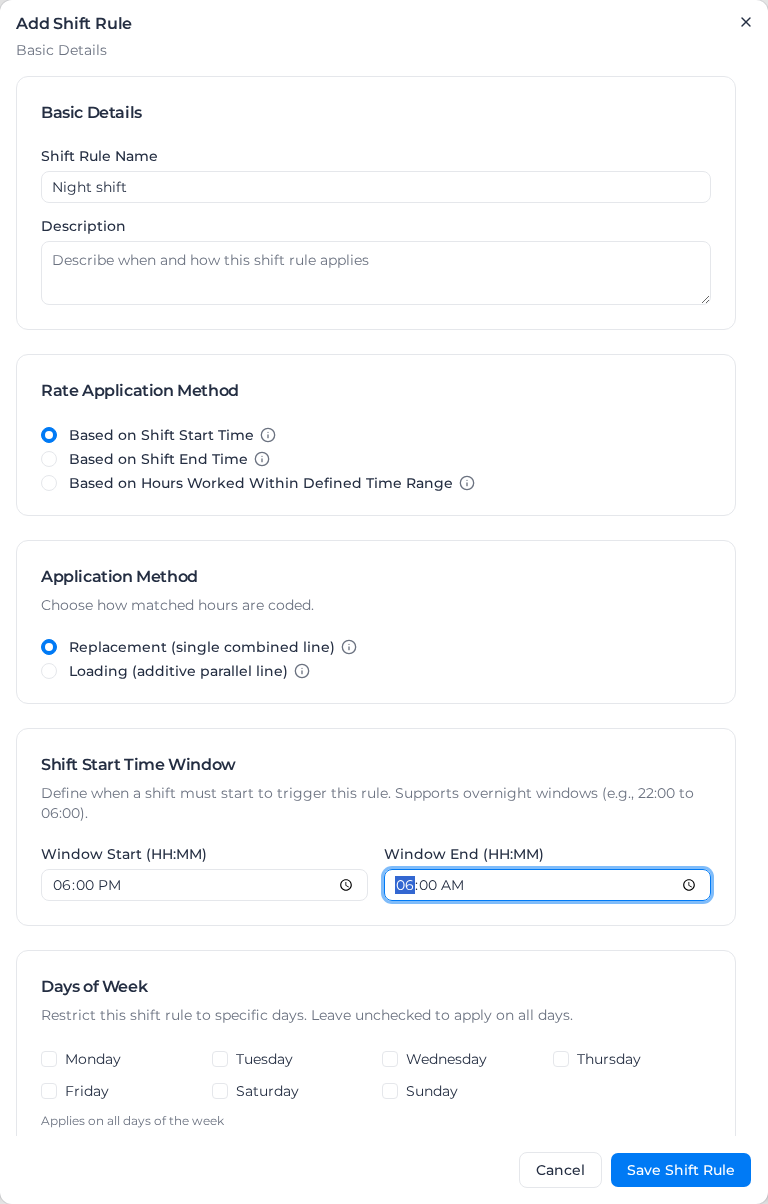
- Under Shift Rules, select Add Shift Rule.
- Enter a Shift Rule Name, such as "Night shift", and optionally a Description.
- Choose the Rate Application Method (see Choose what the window is matched against).
- Choose the Application Method: Replacement (single combined line) or Loading (additive parallel line) (see Pay the premium as a loading line).
- Enter Window Start (HH:MM) and Window End (HH:MM). Overnight windows such as 22:00 to 06:00 work. For Based on Majority of Hours in Window, also set the threshold under Majority Threshold (see Set the threshold).
- Optionally limit the rule to some Days of Week, Activities or Roles (see Limit a rule to some shifts).
- Under Rate Segments, set how the hours are paid (see Segments). Select Add Segment for each extra part of the shift.
- Under Advanced Options, optionally set a Priority and the overtime settings.
- Select Save Shift Rule.
The Shift Rules list shows each rule's Name, Shift Window, Segments and Priority. To change or remove a rule, open its menu and select Edit or Delete.
Choose what the window is matched against
- Based on Shift Start Time (the default): the rule applies to the whole shift when the shift's first activity starts inside the window. The section is called Shift Start Time Window.
- Based on Shift End Time: the rule applies to the whole shift when its last worked activity ends inside the window. Leave on the same timesheet is ignored. Use it for awards that pay by when a shift finishes, such as a night shift ending after 6 am.
- Based on Hours Worked Within Defined Time Range: only the hours worked inside the window get the rule's rate, whenever the shift started. The section is called Time Window.
- Based on Majority of Hours in Window: the rule pays the worker's whole day, every timesheet they have that day in its rule group, when enough of the day's hours fall inside the window. The section is called Majority of Hours Window. See Pay a whole day by majority of hours.
The window end is never included. A shift starting exactly at 6:00 doesn't match a 18:00 to 06:00 start-time window, and a shift ending exactly at 9:00 doesn't match a 00:00 to 09:00 end-time window. For the start and end methods, set the end one minute later (09:01) to include it. Don't do this for the hours-worked or majority-of-hours methods: there the window is a range of hours, and an hour from 08:00 to 09:00 already counts in full.
When more than one rule matches
Majority-of-hours rules are checked first, then start-time rules, then end-time rules, then hours-worked rules, and the first rule that matches is used. Priority (lower number first) only decides between rules of the same method. So a majority-of-hours rule that matches a day wins over a start-time rule, and a start-time rule that matches a shift wins over an end-time rule, whatever their priorities. If no majority-of-hours rule matches, the other rules are matched exactly as before.
If an end-time rule isn't being applied, check for a majority-of-hours or start-time rule that matches the same shifts.
When a finish time can't be read
An end-time rule needs the time the shift finished. If no worked activity on the timesheet has a readable end time, every end-time rule in the group is skipped for that day, and the day shows a processing warning on the weekly summary and calendar: "This rule group has shift rule(s) that match on when a shift FINISHES, but no finish time could be determined for [date] …". Fix the activity times and apply pay rates again.
When start and finish times can't be trusted
Sometimes the times on a timesheet can't be relied on: some activity times couldn't be read, or the timesheet's timezone couldn't be applied. The timesheet is then flagged with a Processing Warning that names the rules that weren't applied.
- On a timesheet with activity times, start-time rules, end-time rules and time-windowed allowances are skipped.
- Hours-worked rules and time-of-day loadings are still paid on the activity times as recorded. The warning says so, because those times may be wrong.
- If another timesheet on the same day has readable times and starts the shift, start-time rules still match through it.
Fix the times on the timesheet and apply pay rates again. Re-applying a period that was paid before this check was added can lower pay on these timesheets, because start-time rules used to be applied to them.
Pay a whole day by majority of hours
Some agreements pay a whole day at the night rate when most of it is worked at night. A Based on Majority of Hours in Window rule does this. It looks at the worker's whole day, not one timesheet:
- The day is every timesheet the worker has on that date, across all orders and pay rate documents. A timesheet that runs past midnight belongs to the date it started.
- Each timesheet counts from its start to its finish, unpaid breaks included. Gaps between separate timesheets don't count, and hours where two timesheets overlap count once.
- Leave timesheets, including leave recorded through a leave role, and public holiday timesheets added automatically from the calendar aren't counted.
The rule compares the hours inside the window with the day's total hours. When the share meets the threshold, the rule pays every hour of every timesheet that day in its rule group, including timesheets earlier in the day. Days of Week is checked once for the whole day, against the date the day belongs to, so a Saturday-only rule also pays the hours after midnight on the Sunday. Each hour is then checked against the rule's Activities and Roles filters.
With a window of 18:00 to 04:00 and the default threshold (More than 50%):
| Day's timesheets | Hours in window / total | Result |
|---|---|---|
| 14:00 to 23:00 | 5 / 9 | The rule pays the whole day |
| 10:00 to 20:00 | 2 / 10 | Paid normally |
| 16:00 to 20:00 | 2 / 4 | Paid normally: an exact half isn't more than 50% |
| 20:00 to 04:00 | 8 / 8 | The rule pays the whole day |
| 07:00 to 11:00 and 17:00 to 05:00 | 10 / 16 | The rule pays both timesheets |
| 14:00 to 23:00 with a 1-hour unpaid break at 20:00 | 5 / 9 | The rule pays the whole day: the break counts |
Set the threshold
- Comparison: More than (the default) or At least. This decides a tie. With More than 50%, a day exactly half in the window is paid normally; with At least 50%, the rule pays it.
- Share of the day's hours in the window (%): 50 by default. Any number above 0 and up to 100 works, such as 66 for two thirds.
The Shift Rules list shows the rule as Majority in window, with its threshold beside it when it isn't the default, and Sat/Sun/PH rates win when the day rules take precedence.
Saturdays, Sundays and public holidays
By default, a majority-of-hours rule that matches a day pays it instead of the Saturday, Sunday or public holiday rule. Other shift rules work differently: the shift rule and the day rule are compared, and whichever pays more is used.
Turn on Let Saturday, Sunday and public holiday rates take precedence to have the Saturday, Sunday or public holiday rule pay the day instead, for example a public holiday paid at 2.5x whatever time it was worked.
To pay a weekend night at both the weekend rate and the night rate, add a majority-of-hours rule for each day type, such as one for Monday to Friday at 1x, one for Saturday at 1.5x and one for Sunday at 2x, all on the same window and with the same loading.
Segments on a majority-of-hours rule
Segments set by position (First N Hours, After N Hours, Hour Range) and Remaining Hours pay the whole day. Segments set by clock time (Before Time, After Time, Between Times) still pay by the clock, so they only cover the hours at those times. To pay every hour of the day at the rule's rate, use a Remaining Hours segment.
Last N Hours can't be used on a majority-of-hours rule, because it counts back from the end of each timesheet rather than the end of the day.
When the day can't be measured
The rule needs a real start and finish for every counted timesheet that day. If any of them has times that can't be read or trusted, the rule isn't applied to that day, and the day shows a processing warning naming the rule. Fix the times and apply pay rates again.
When the rule changes how a day is paid, every timesheet that day in its rule group is priced again, including timesheets applied earlier. A timesheet that was coded by hand or is under review keeps its pay, and the day shows a warning saying so.
Each line the rule pays explains why in the Rate Calculation Details, for example "Night (majority): 10.0 of 16.0 h (62.5%) in 18:00–04:00".
Segments
Each segment pays part of the shift.
- Hour Bucket Type: which hours the segment covers (below).
- Rate Type: Regular Time, Overtime or Second Overtime. This sets a default Multiplier you can change.
- Multiplier: the rate as a multiple of the base rate.
- Fixed Rate Override: a dollar rate per hour instead of the multiplier.
- Use Shift Rate from Tree: the shift rate set for the classification on the rate tree, so each role can have its own shift rate.
- Cost Code: the cost code for the segment's pay line.
- Apply loading to this segment: only shown when the rule pays a loading line. On by default; turn it off to pay the segment's hours on their ordinary line with no loading.
A fixed rate wins over the rate tree's shift rate, which wins over the multiplier.
| Hour Bucket Type | Covers |
|---|---|
| First N Hours | The first hours of the shift |
| After N Hours | Hours after a number of hours into the shift |
| Hour Range | A range of hours into the shift, such as hours 4 to 8 |
| Last N Hours | The last hours of the shift |
| Remaining Hours | Every hour no other segment covers |
| Before Time | Hours before a clock time, such as 7:00 |
| After Time | Hours after a clock time, such as 18:00 |
| Between Times | Hours between two clock times, such as 22:00 and 06:00 |
A shift rate marked "Not paid"
A tree shift rate is paid from the classification a timesheet is paid from. If a classification has no rates of its own but has classifications with rates below it, its timesheets are paid from the ones below, so a shift rate on it is never paid.
On the Rate Tree tab, such a shift rate shows "Not paid: pay is calculated from the classifications below this one." You can't change it, only remove it: select the bin beside it (Clear shift rate). Then set the shift rate on each classification below instead.
Per-tier and segment shift rates stored on such a classification show under Unpaid shift rates. Remove them with Clear per-tier shift rates or Clear segment shift rates.
Where each segment falls
Each segment is paid on the hours it covers on the clock, whatever order you add the segments in. On a 07:00 to 15:00 shift, a Last N Hours segment of 2 hours is paid, and shown on the timesheet, at 13:00 to 15:00. A Remaining Hours segment beside a Between Times segment of 10:00 to 12:00 covers 07:00 to 10:00 and 12:00 to 15:00, shown as two lines. Where a segment falls can change pay, because time-of-day loadings and overtime depend on when an hour was worked.
Sometimes the segments can't be placed on the clock:
- two segments cover the same hours, such as a Between Times segment inside the First N Hours;
- on a Based on Hours Worked Within Defined Time Range rule, the window doesn't include the hours a segment counts, such as Last N Hours whose last hours fall after the window ends;
- an activity's hours differ from the time between its start and end, or one of its times can't be read.
The segments are then placed in the order the rule lists them, with Remaining Hours last. Each is still paid for the same number of hours, but a Last N Hours segment may be treated as falling at the start of the shift when time-of-day loadings and overtime are worked out. The timesheet's Rate Calculation Details say so, naming the rule, the activities and the reason. Fix overlapping segments or the activity times; the window case is a limit of how the window is counted.
On a Based on Hours Worked Within Defined Time Range rule, a Before Time, After Time or Between Times segment is paid on every hour it covers, inside the rule's window or not. An hour before the window is paid once: at the segment's rate if a segment covers it, otherwise at the base rate. For example, with a window of 18:00 to 22:00 and an After Time segment from 16:00, a 14:00 to 22:00 shift is paid at the base rate from 14:00 to 16:00 and at the segment's rate from 16:00 to 22:00. The Rate Calculation Details show how many hours before the window the segment covered.
Pay already calculated keeps its old lines until you apply pay rates again. That can lower pay on hours-worked rules whose segment hours before the window used to be paid twice, at the base rate and at the segment's rate.
Limit a rule to some shifts
- Days of Week: tick the days the rule applies to. None ticked means every day.
- Activities: pick the activities the rule applies to. None picked means every activity.
- Roles: choose Exclude selected roles (everyone except the roles you pick) or Only include selected roles (only those roles), then pick the roles. With Only include selected roles you must pick at least one. A timesheet with no role is skipped by an include rule and unaffected by an exclude rule.
A shift must meet all of the filters. Hours on a shift a rule skips are paid normally, or by a lower-priority rule that does match.
Pay the premium as a loading line
With Loading (additive parallel line), each hour the rule covers is paid on two lines: the ordinary line at the segment's rate, and a loading line at a percentage of the base rate with its own cost code. Use it when payroll needs the shift premium as a separate item.
- Loading Rate (% of base): 50 pays a loading of half the base rate.
- Loading Cost Code: the cost code for the loading line.
- Loading Hours Cap (optional): stops the loading after this many hours. Leave it empty to load every hour the rule covers, overtime included.
Keep the segment at the ordinary rate (a Regular Time segment at 1x) and put the premium in the loading rate. The loading is always a percentage of the base rate, so an overtime hour gets its overtime line plus the same loading, not a larger one.
The cap counts the hours the rule covers, earliest first. On a 12-hour night shift with a cap of 8, the first 8 hours get the loading and the overtime at the end doesn't. An overnight shift counts from its own start. The cap must be more than zero; to remove the loading altogether, switch the rule back to Replacement (single combined line).
The cap is per timesheet. Two loading rules on the same day each have their own cap, but one rule that matches two separate blocks of a timesheet has one cap for both.
On a Based on Hours Worked Within Defined Time Range rule, the loading covers the hours the rule's segments cover: the hours inside the window, plus any hours a Before Time, After Time or Between Times segment covers outside it (see Where each segment falls). Daily overtime inside the window is loaded like any other hour the rule covers, and daily overtime outside it isn't. A 15:30 to 03:30 shift under a rule for 18:00 to 06:00 gets the loading from 18:00, daily overtime included, and its hours before 18:00 are paid as ordinary time with no loading. A rule with no Remaining Hours segment doesn't load the window's hours after its last segment either.
This needs the segments placed on the clock. When they can't be (see Where each segment falls), the loading covers what it did before: a rule whose segments are all Regular Time at 1x, with no cost code on any segment, loads the whole shift, hours outside the window included, and any other rule loads only the hours its segments price, not daily overtime. The Rate Calculation Details name the rule when its segments couldn't be placed.
Two things used to be different. A rule whose segments were all Regular Time at 1x, with no cost code on any segment, loaded the whole shift, hours outside the window included. A rule whose segments set a rate or a cost code didn't load its daily overtime inside the window. Pay already calculated keeps its old lines until you apply pay rates again, which can lower pay for the first kind of rule and raise it for the second.
Leave part of the shift unloaded
Some awards load only part of a shift. For example, a night shift pays its first 4 hours as travel time with no night loading, and the rest at the base rate plus a 100% loading. Add a First N Hours segment of 4 hours for the travel and a Remaining Hours segment for the rest, then turn off Apply loading to this segment on the travel segment.
With no overtime, a 12-hour shift then pays 4 hours of travel, 8 ordinary hours, and the loading on those 8 hours. A shift of 4 hours or less gets no loading. The travel hours are never loaded, whatever they are paid at, including overtime, a weekend rate or a time-of-day rate. Hours in an unloaded segment don't count toward the Loading Hours Cap (optional).
To put a loading on every worked hour instead, such as a casual loading, use Worked hours loading. The two can be used together; neither loads the other.
Overtime settings
Contributes to Overtime (on by default) decides whether the hours the rule prices count toward the daily and weekly overtime thresholds. Turn it off and hours paid above the base rate by the rule (premium, fixed-rate, rate-tree and overtime segments) don't use up the day's ordinary hours or count toward the weekly threshold. Segments at the plain base rate still count.
For example, an early-start rule pays 04:00 to 06:00 at 1.5x on an 11-hour day, with daily overtime after 7.6 hours and double time after 10:
| Contributes to Overtime on | Contributes to Overtime off | |
|---|---|---|
| Early start (1.5x) | 2 h | 2 h |
| Ordinary time | 5.6 h | 7.6 h |
| Overtime | 2.4 h | 1.4 h |
| Double time | 1 h | none |
With it off, only the 9 hours outside the window count, so the worker gets the full 7.6 ordinary hours and never reaches double time. A time-of-day loading over the same hours doesn't apply to the hours the rule holds out.
Prevent Daily Overtime Calculation pays the matched hours with the rule's segments only, with no daily overtime. With it on, every hour the rule matches is held out of the thresholds, base-rate segments included.
On a Based on Hours Worked Within Defined Time Range rule with Prevent Daily Overtime Calculation on, the hours outside the window aren't the rule's. A time-of-day loading over them is paid as on any other shift; inside the window the rule's segments price the hours outright, so a time-of-day loading there isn't paid. Where two time-of-day loadings cover the same hours outside the window, each is paid on its own hours, and an hour both cover is paid at the higher loading. On a weekday, these hours used to be paid at the base rate with no loading, so pay already calculated can go up when you apply pay rates again.
Shift Premium Counts Toward OT1 makes premium shift hours (above 1x) use up the first daily overtime tier, so more of the day's overtime moves to the second tier. It needs a second daily overtime tier to have any effect, and it is ignored when Prevent Daily Overtime Calculation is on. Because it moves hours from the first overtime tier to the second, it can start weekly overtime later and lower a week's pay; check a full week of real timesheets before you use it.
Saturday, Sunday and public holiday hours priced by a day rule aren't affected by these settings. Hours held out of the daily and weekly thresholds still count toward a fortnightly threshold.
When a shift runs into daily overtime
With Prevent Daily Overtime Calculation off, daily overtime still applies to the shift. Ordinary hours take the segment rate. Once the day reaches a daily overtime tier, each hour the rule covers is paid at the higher of the daily overtime rate and the rate of the segment covering that hour. A tie goes to daily overtime.
For example, a night rule (18:00 to 06:00) pays the first 8 hours at 1.5x and the rest at 2.0x, and daily overtime is 1.5x from 8 to 10 hours and 2.0x after 10. On an 18:30 to 05:30 shift with a 30-minute break:
| Time | Paid at | Why |
|---|---|---|
| 18:30 to 03:00 (8 h worked) | 1.5x | The rule's first 8 hours |
| 03:00 to 05:00 (2 h) | 2.0x | Overtime is only 1.5x here, and the rule's 2.0x is higher |
| 05:00 to 05:30 (0.5 h) | 2.0x | Double time, which ties the rule |
Hours outside the rule's window keep the daily overtime rate.
An hour re-priced this way still belongs to its overtime tier: it is reported, exported and counted toward weekly thresholds as that tier's hours. In the example, the 03:00 to 05:00 hours are first-tier overtime. Only the hour's rate, cost code and line label (Overtime (Shift Rule) or Second Overtime (Shift Rule)) come from the rule.
The two rates are compared at what the worker is actually paid. If the worker has their own pay rate on the overtime cost code, or on the segment's cost code, that rate is the one compared.
The comparison never changes these:
- Overtime split by activity. If a daily overtime tier splits overtime for the activity, such as salary-inclusive overtime at 0x, that rate still applies to those hours.
- A loading overtime tier. It is compared at what it pays: the base rate plus its loading, such as 1.6x for a 60% loading, not its multiplier.
- A loading shift rule's loading line. A higher rule rate can change an overtime hour's rate, but not whether the rule's loading line applies to it.
- Custom activity rules. A re-priced overtime hour doesn't become shift-coded time for a custom rule's During shift-coded time condition.
Daily overtime keeps the hour, with no comparison, when:
- the rule was converted from a time-of-day rule. These rules keep their old behaviour;
- the rule's segments can't be placed on the clock (see Where each segment falls). For example, when a Between Times segment sits inside the First N Hours, both are paid for the overlapping hour, so it has no single place on the clock. The overtime hours keep the daily overtime rate, and the Rate Calculation Details name the rule;
- an all-hours time-of-day loading already pays the hour more than daily overtime does. An overtime-hours-only loading is different: it is added to daily overtime only while daily overtime is the higher rate, so where the rule pays more, the hour takes the rule's rate without the loading;
- the hour's time category is unpaid.
Past a weekly second-overtime threshold, a re-priced hour converts at the weekly rate like any other overtime hour, even where the rule's rate is higher.
On a timesheet with activities, in a week past a weekly overtime threshold, hours priced by a shift rule's Overtime or Second Overtime segments used to be left off the pay lines, so the worker was paid for fewer hours than they worked. This happened whether Contributes to Overtime was on or off. Pay already calculated keeps its old lines until you apply pay rates again, which raises it.
Weekend days with their own rate
With Prevent Daily Overtime Calculation on, a shift rule and the weekend rate of a Saturday or Sunday aren't combined. Whichever pays the day more is used, and the other isn't paid. A time-of-day loading counts on the weekend rate's side, because the shift rule prices its hours outright. A majority-of-hours rule isn't compared: it pays the day unless Let Saturday, Sunday and public holiday rates take precedence is on (see Saturdays, Sundays and public holidays).
On a timesheet with activities, the two are compared on what each pays after weekly overtime. On the shift rule's side, an hour that becomes weekly overtime counts at the weekly overtime rate. On the weekend rate's side, it counts at the rate it keeps: for an hour a loading covers, the loading or the weekly overtime rate, whichever is higher.
Pay already calculated keeps its old lines until you apply pay rates again. That can raise it where a loading tipped the comparison to the weekend rate on hours that then became weekly overtime, so the day was paid less than the shift rule pays it.
Fix a time-of-day rule with no usable rate
Some documents extracted from an agreement also hold time-of-day rules: a premium for hours worked in a time window, paid as a percentage loading or a multiplier. When the rate could not be read from the agreement, the rule is saved without one. A time-of-day rule needs a loading, or a multiplier above zero; without one it is never applied, so its premium is not paid.
You can tell a rule has no usable rate in three places:
- In Review & Edit Document, the rule shows No usable rate instead of a rate, with "No usable rate, so this rule is never applied and its premium is not paid. Ask Milo to set its rate or delete the rule."
- On each day the rule would have covered, a processing warning names the rule, its window and the document, and says its premium is missing from that day.
- When you save any other change to the document, the save is refused with "This pay rate document already has a time-of-day rule with no usable rate: …", naming the rule and its rule group. Nothing else can be saved until the rule is fixed.
To fix it:
- Open Review & Edit Document and, in the Milo - Document Editor panel, ask Milo to set the rule's rate from your agreement, for example "Set the Night loading in Casual Employees to a 25% loading". If the rule shouldn't be there, ask Milo to delete it instead.
- If the document has several such rules, fix them one at a time. Each fix saves on its own.
- Apply pay rates again to the affected timesheets. Pay that was already calculated doesn't change until you do.
A shift rule converted from a time-of-day rule with no usable rate pays no premium either, and its days get a warning that says so. Set the Multiplier on the rule's first segment, then apply pay rates again.
Time-of-day loadings on overtime hours
A time-of-day loading applies to normal hours only, to all hours, or to overtime hours only. The setting decides what an overtime hour inside the loading's window is paid:
| Setting | Normal hours in the window | Overtime hours in the window |
|---|---|---|
| Normal hours only | Base rate plus the loading | The overtime rate |
| All hours | Base rate plus the loading | The higher of the loaded rate and the overtime rate, never both added together |
| Overtime hours only | Not loaded | Daily overtime: the overtime rate plus the loading. Weekly overtime, or an hour a shift rule pays more for: not loaded |
For example, at $100 an hour with daily overtime at 1.5x, a 25% all-hours loading pays an overtime hour $150, because 1.5x beats 1.25x. A 60% all-hours loading pays it $160. A 25% overtime-hours-only loading pays it $175.
"The overtime rate" is what the hour would be paid without the loading. When daily overtime is set up as a loading on the base rate, such as 1x plus a 40% overtime loading, that rate is 1.4x, so a 5% overtime-hours-only loading pays the hour 1.45x. When a second loading applies to overtime hours only, the hour is paid the overtime rate plus that loading, and an all-hours loading is compared with that total.
A normal hour that becomes weekly overtime is an overtime hour, so a normal-hours-only loading isn't paid on it.
On timesheets with no activities, two things work differently:
- Where Pay can't place the loadings at their clock times (see When two loadings cover the same shift below), an all-hours loading and an overtime-hours-only loading on the same overtime hours aren't compared. The overtime-hours-only loading is paid on those hours, and the all-hours loading on the shift's other normal hours. Where it can, they're compared as on a timesheet with activities. That includes a public holiday and a weekend day with its own rate.
- When the timesheet's start and finish times weren't recorded, or span fewer hours than were paid, Pay can't tell where in the shift the normal and overtime hours fall. A normal-hours-only or overtime-hours-only loading is then paid on as many of the shift's normal hours (or overtime hours) as its window has hours in the shift, wherever those hours fall. For a normal-hours-only loading, that is at most the normal hours left after weekly overtime.
- When a worker pay rate is set on the loading's cost code, the loading's hours are still counted from its window, but they are paid on the shift's normal hours (or overtime hours) wherever those hours fall, as above.
A loaded overtime hour is still overtime. Its pay line is named after the loading with OT, Double Time, Weekly OT or Weekly Second OT added, such as Night OT (60%). It carries the loading's cost code and is reported and exported as overtime. When the overtime rate wins, the hour stays on the ordinary overtime line.
A worker's own pay rate on the loading's cost code sets the rate of the loading's normal hours only. An overtime hour the loading pays keeps its calculated rate, so it is never paid less than the overtime rate. A worker pay rate or activity override on the ordinary overtime cost code doesn't change that hour either, because it carries the loading's cost code.
All of this applies on weekdays, and on a Saturday or Sunday with no weekend rate. On a timesheet with activities, it also applies to weekly overtime on a Saturday or Sunday with its own weekend rate. There, an hour an all-hours loading covered that becomes weekly overtime is paid the loading or the weekly overtime rate, whichever is higher. An hour a normal-hours-only or overtime-hours-only loading covered is paid the weekend rate or the weekly overtime rate, whichever is higher.
Otherwise, on a public holiday, or on an RDO, picnic day or weekend day with its own rate, a loading combines with overtime as it did before, except as described below. An RDO or picnic day with no rate of its own is priced like a weekday, and so are the weekday hours of a shift that crosses midnight into or out of a public holiday.
On a public holiday, or an RDO or picnic day with its own rate, an overtime-hours-only loading is still added on top of what the daily overtime hour is paid, except where a shift rule pays more than daily overtime for the hour. The day's premium is added to the overtime rate too, so each overtime hour in the window gets whichever adds more: the loading, or the day's premium if it is at least as large. For example, at $50 an hour, with daily overtime at 1.5x and a 2.5x public holiday rate (1.5x on top of the base rate), a 200% overtime-hours-only loading pays a holiday overtime hour $175 (1.5x plus 2.0x). A 100% loading pays it $150: the overtime rate plus the holiday premium.
An all-hours loading on those days is added on top of what each hour it covers is paid, normal or overtime, as the day's premium is. The loading is paid if it is larger than the premium. Otherwise its hours get the premium. A daily overtime hour that weekly overtime then takes is paid the weekly overtime rate, with the loading or the premium on top. For example, at $100 an hour, with daily overtime at 1.5x and a 2.5x public holiday rate (1.5x on top of the base rate), a 200% all-hours loading pays a holiday normal hour $300 (1x plus 2.0x) and a holiday overtime hour $350 (1.5x plus 2.0x). A 150% loading is no larger than the 1.5x premium, so those hours are paid $250 and $300.
On a timesheet with activities, two kinds of hour on those days are paid differently. A normal hour that weekly overtime takes is paid the weekly overtime rate plus the day's premium, and the loading is not paid on it. On a timesheet without activities, an all-hours loading is added on top of the weekly overtime rate for that hour, as for any other hour. A normal-hours-only loading isn't paid on it. An overtime hour that a shift rule pays more for than daily overtime is paid the loaded rate or the shift rule's rate plus the day's premium, whichever is higher.
Pay already calculated keeps its old lines until you apply pay rates again, which can move it either way.
It can go lower where:
- an all-hours loading used to be added on top of overtime;
- an overtime-hours-only loading used to be paid on weekly overtime;
- on a timesheet without activities, a normal-hours-only loading used to be paid on normal hours that became weekly overtime, on top of the weekly overtime rate. Where the start and finish times were recorded, it was instead paid on normal hours earlier in the shift, outside its window;
- on a timesheet with activities, a worker pay rate on the loading's cost code used to re-price the overtime hours the loading paid;
- on a timesheet with activities, a shift had two loadings and one of them covered none of the shift's normal hours, or none of its overtime hours. In that part of the shift, the other loading's hours were paid at the higher loading, on its line;
- on a timesheet with activities, on a Saturday or Sunday with its own weekend rate, a loading that beat that rate was paid on every hour of the day: outside its window, past its limit, and on overtime hours a normal-hours-only loading doesn't cover. Each loading is now paid on its own hours only, and where two loadings cover the same hour, the higher one is paid;
- on a timesheet without activities, an all-hours loading on a Saturday or Sunday with no weekend rate used to be paid on normal hours outside its window instead of its overtime hours;
- on a timesheet without activities whose start and finish times were recorded, an overtime-hours-only loading used to be paid on overtime hours outside its window, or, on a shift that crosses midnight out of a public holiday, had the hours after midnight priced as the public holiday;
- on a timesheet with activities, an overtime-hours-only loading larger than the holiday premium covered an overtime hour on a public holiday, or an RDO or picnic day with its own rate, where a shift rule pays more than daily overtime. The hour is now paid the shift rule's rate plus the premium, without the loading, as on a weekday;
- on a timesheet without activities, an all-hours loading larger than the holiday premium covered holiday overtime paid by an overtime loading, and was added to the overtime multiplier instead of the overtime loading's rate. Where the overtime loading's rate is above the multiplier, pay goes up instead.
It can go higher where:
- an all-hours loading beats weekly overtime;
- an overtime-hours-only loading wasn't paid;
- an overtime-hours-only loading was added to the overtime multiplier rather than the overtime loading's rate;
- on a timesheet without activities whose start and finish times were recorded, a normal-hours-only loading used to be paid on normal hours outside its window, and an all-hours loading's normal hours were moved onto weekly overtime in their place. Those hours are now paid as normal hours with the all-hours loading;
- on a timesheet with activities, a loading's hours on a Saturday or Sunday with its own weekend rate became weekly overtime and were paid the weekly overtime rate, below the loading or the weekend rate;
- on a timesheet without activities whose start and finish times were recorded, an overtime-hours-only loading on a shift that crosses midnight into a public holiday stopped the hours after midnight being priced as the public holiday;
- on a timesheet without activities, a public holiday's hours included double time, and an overtime-hours-only loading was paid on them instead of the public holiday rate, which paid more;
- on a timesheet without activities, a public holiday, or an RDO or picnic day with its own rate, had overtime, and an all-hours loading no larger than the holiday premium was paid on the hours it covered instead of the premium. Those hours now get the holiday premium on top of their normal or overtime rate. Where daily overtime is paid as a loading smaller than its multiplier (for example 1.5x paid as a 40% loading), an overtime hour can be paid less instead. The timesheet also had a warning that the public holiday premium could not be reconciled against the loading. It no longer appears, whether the loading or the premium is larger;
- on a timesheet with activities, an overtime-hours-only loading larger than the holiday premium covered overtime hours on a public holiday, or an RDO or picnic day with its own rate, and was paid on the base rate instead of on top of the overtime rate, or lost to the premium;
- on a timesheet with activities, an all-hours loading larger than the holiday premium covered daily overtime hours on a public holiday, or an RDO or picnic day with its own rate, and was paid on the base rate instead of on top of the overtime rate, or lost to the premium;
- on a timesheet with activities, a public holiday, or an RDO or picnic day with its own rate, had weekly overtime priced above daily overtime, and an all-hours loading that paid more than daily overtime covered daily overtime hours. Those hours stayed on the daily overtime rate or the loaded rate. They are now paid the weekly overtime rate, with the loading on top where it is larger than the premium, and the premium on top otherwise;
- on a timesheet without activities, such a loading covered holiday overtime paid by an overtime loading, and was added to the overtime multiplier instead of the overtime loading's rate;
- on a timesheet with activities, casual loading applies to overtime and a loading was paid on an overtime hour on a public holiday, or an RDO or picnic day with its own rate. That hour now gets the casual loading too.
On a timesheet with activities, applying pay rates again also reports an overtime hour a loading was paid on, on a public holiday or an RDO or picnic day with its own rate, as overtime and loading instead of public holiday pay. A worker's own pay rate on the loading's cost code no longer re-prices that hour; it keeps its calculated rate, so its pay goes up where the worker's rate was lower and down where it was higher.
A loading window that ends at 23:59
A time-of-day loading whose window ends at 23:59 runs until midnight. On a shift worked past midnight, the last minute before midnight is loaded like the rest of the window, so there is no one-minute line at the plain rate. A window that starts at 23:59 still starts then. The same goes for a shift rule converted from a time-of-day rule that pays the hours worked within its time range; other shift rules still end at 23:59.
For example, at $100 an hour, with daily overtime at 1.5x after 8 hours and 2x after 10, take a 25% overtime-hours-only loading from 14:00 to 23:59. A 12:00 to midnight shift pays 8 normal hours at $100, 2 overtime hours at $175 and 2 double-time hours at $225: $1,600 in all.
Pay already calculated keeps its old lines until you apply pay rates again, which adds the loading on that last minute and removes the one-minute line.
Limit a loading to a number of hours
Some agreements pay a time-of-day loading on only the first few hours of the evening. To do that, ask Milo to set the loading's maximum hours. With no maximum, the loading covers every hour in its window.
The limit counts the earliest hours in the window that the loading applies to, so normal hours come before overtime. A normal-hours-only loading counts only normal hours, and an overtime-hours-only loading only overtime hours. An hour past the limit is paid as if the loading didn't cover it: a normal hour at the base rate, an overtime hour at the overtime rate.
For example, at $100 an hour with daily overtime at 1.5x after 8 hours, take a 25% normal-hours-only loading from 14:00 to midnight with a maximum of 4 hours. A 12:00 to 22:00 shift pays 14:00 to 18:00 at $125, the other 4 normal hours at $100 and the 2 overtime hours at $150: $1,200 in all.
On a timesheet with activities, each activity has its own limit, so two activities inside the window can each be loaded up to it. An activity that runs past midnight into a different kind of day, such as a Sunday with its own rate into a Monday, is split at midnight, and the Monday part has its own limit. A timesheet without activities has one limit for the whole shift.
On a timesheet with activities, the limit also holds on a Saturday or Sunday with its own weekend rate. There, the loading's hours are paid at the loading or the weekend rate, whichever is higher, and every other hour is paid as it would be with no loading. Where the weekend rate is higher for the first hours of the day, the loading is compared with the rate of the hours it actually covers. In a week with weekly overtime, the loading's hours that become weekly overtime are paid as described in Time-of-day loadings on overtime hours.
Pay already calculated on a timesheet with activities keeps its old lines until you apply pay rates again, which can move it either way:
- Lower, where the loading was paid across its whole window, past the limit. On a Saturday or Sunday with its own weekend rate, a loading that beat that rate was paid on the whole day, including hours outside its window.
- Higher, in a week with weekly overtime, where the loading was left off the hours before weekly overtime started. This can also raise a loading with no limit whose window starts at midnight, on the part of an activity that was split off after midnight. On a Saturday or Sunday with its own weekend rate in such a week, hours the loading didn't cover could be paid at the base rate instead of the weekend rate, and hours it did cover at the weekly overtime rate, below the loading or the weekend rate.
When two loadings cover the same shift
Each time-of-day loading is paid on its own hours: the hours inside its window, up to its limit, at its own rate. Each has its own pay line with its own cost code. Where two windows cover the same hour, that hour is paid at the higher loading, never both added together. Where both loadings pay the same rate, the hour still goes to one of them only, the same one on every timesheet. This needs Pay to place the loadings at their clock times; where it can't, the loadings are paid as described further down, and the timesheet's Rate Calculation Details say so.
A loading's limit is always its earliest hours in the window, even where a higher loading takes some of them. Those hours are paid at the higher loading, and the lower loading isn't paid on later hours to make up for them. For example, take a 25% loading from 14:00 to midnight with a maximum of 2 hours, and a 40% loading from 14:00 to 17:00. On a 12:00 to 22:00 shift, the 25% loading's 2 hours are 14:00 to 16:00, which the 40% loading takes, so the 25% loading isn't paid at all.
On a timesheet without activities, Pay places two loadings whose windows overlap at their clock times wherever the shift's start and finish times were recorded. That includes a rule group with fortnightly overtime or overtime paid as a loading, a worker with a pay item on one of the loadings' cost codes, a public holiday, a Saturday or Sunday with its own weekend rate, an RDO or picnic day with its own rate, and a shift that runs into a different kind of day.
A timesheet without activities doesn't record when an unpaid break was taken, so for two overlapping loadings Pay takes it at the end of the shift, and the timesheet's Rate Calculation Details say so. For example, at $100 an hour with daily overtime at 1.5x after 8 hours, take a 60% loading from 14:00 to midnight and an 80% loading from 14:00 to 20:00. A 12:00 to 22:30 shift with 10 paid hours is treated as 12:00 to 22:00: 14:00 to 20:00 at $180, 20:00 to 22:00 at $160 and 12:00 to 14:00 at $100, $1,600 in all. With activities, Pay uses where the break was: $1,590 with the break at 17:00, as the 80% loading loses half an hour.
Pay doesn't take the break at the end in two cases. The overlapping loadings are then paid as when the times weren't recorded, below, each on every hour its window covers:
- Where another loading's window reaches into the end of the shift, such as a 50% loading from 22:00 to midnight. Where the break was decides how many hours that loading is paid, so Pay doesn't move it.
- On a shift that runs into a different kind of day, where Pay counts the break before midnight when it works out which day each hour falls on. It does that when the paid hours alone don't reach midnight.
Where the times weren't recorded, or the break can't be taken at the end as above, each loading is paid on as many hours as its window covers, so an hour two windows cover is loaded once for each, and the timesheet's Rate Calculation Details name the two loadings. The hours the shift can't hold keep only the loading's premium, on a line of their own such as Night Premium (25%), and the timesheet gets a warning naming the loading.
On a timesheet with activities, Pay can't place the loadings at their clock times on an activity part of which a shift rule with Contributes to Overtime off prices, or, rarely, where it can't work out exactly which hours a loading covers. There, the loadings' hours are added together and paid at the highest of their rates, on that loading's line. A lower loading's hours can then be paid at the higher rate, and where the windows overlap, hours neither window covers can be loaded too. The timesheet's Rate Calculation Details name the activity.
For example, at $100 an hour with daily overtime at 1.5x after 8 hours, take a 25% loading from 14:00 to midnight with a maximum of 1 hour, and a 10% loading from 12:00 to 13:00. A 12:00 to 22:00 shift pays 12:00 to 13:00 at $110, 14:00 to 15:00 at $125, the other 6 normal hours at $100 and the 2 overtime hours at $150: $1,135 in all.
With two normal-hours-only loadings on the same shift, 60% from 14:00 to midnight and 10% from 18:00 to midnight, both cover 18:00 to 20:00. Those hours are paid at the 60% loading only, so the shift pays 14:00 to 20:00 at $160, 12:00 to 14:00 at $100 and the 2 overtime hours at $150: $1,460.
Pay already calculated keeps its old lines until you apply pay rates again, which can move it either way:
- Lower, where an hour two windows cover was loaded once for each. On a timesheet without activities where Pay places the loadings by the clock, the second loading was paid on hours outside its window, or a limited loading was paid on later hours after a higher loading took its earliest ones. This now includes the rule groups, pay items and days listed above, and shifts with an unpaid break, where both loadings used to be paid on every hour of their windows. On a timesheet with activities, one loading's hours could also be paid at another, higher loading, on its line; on a Saturday or Sunday with its own weekend rate, only where one of the loadings had a limit.
- Higher, on a timesheet with activities in a week with weekly overtime, where a loading's hours were left at the base rate. On a timesheet without activities, also where a worker's pay item on a loading's cost code pays more than the loading does: more of that loading's hours now sit on normal time, which is where the pay item applies.
Older and unrecognised settings
In documents extracted before March 2026, a loading meant for normal hours only could be stored under an older setting that was paid on all hours. On a shift that ran into daily overtime inside the loading's window, the loading was paid on those overtime hours as well. Those loadings are now paid on normal hours only, as the agreement intended. Pay already calculated keeps the extra loading until you apply pay rates again, which can lower it. The setting is corrected the next time the document is saved.
If a loading's setting is missing or not recognised, it is paid on normal hours only, and each affected timesheet gets a Processing Warning naming the loading and the document. Saving other changes leaves the setting as it is, so the warning stays until the setting is fixed. To fix it, check which hours your agreement pays the loading on, ask Milo in Review & Edit Document to set normal hours, all hours or overtime hours, then apply pay rates again.
In a document not yet moved to shift rules, saving any change moves each time-of-day loading into a shift rule that pays on normal hours only. Three kinds of loading stay where they are: overtime-only loadings, loadings with no usable rate, and loadings whose setting isn't recognised. So in these documents a loading can be set to normal hours only or overtime hours only, but not to all hours: setting it to all hours moves it into a shift rule, and Milo tells you so.
Examples
Night shift. Based on Shift Start Time, window 18:00 to 06:00, a First N Hours segment of 2 hours at 1.25x and a Remaining Hours segment at 1.5x. Shifts starting between 18:00 and 06:00 get those rates.
Night shift that finishes in the morning. Based on Shift End Time, window 00:00 to 09:01, one Remaining Hours segment at 1.5x. Any shift that finishes between midnight and 09:00 is paid at 1.5x for its whole length, whether it started at 16:00 or 02:00.
Afternoon loading on two lines. Based on Shift Start Time, window 10:00 to 18:00, Monday to Friday, Loading (additive parallel line), a Remaining Hours segment at 1x (Regular Time) with cost code 100, Loading Rate (% of base) 50 and Loading Cost Code 140AC. A 7.6-hour afternoon shift pays 7.6 hours on 100 at the base rate and 7.6 hours on 140AC at half the base rate.
Night loading for a mostly-night day. Based on Majority of Hours in Window, window 18:00 to 04:00, More than 50%, Loading (additive parallel line), a Remaining Hours segment at 1x (Regular Time) and a night loading. A worker with timesheets of 07:00 to 11:00 and 17:00 to 05:00 on the same day has 10 of 16 hours in the window, so both timesheets are paid with the night loading. A 10:00 to 20:00 day has 2 of 10 hours in the window and is paid normally.