

Consecutive shift rules
Pay a higher rate once a worker has worked a number of days in a row.
A consecutive shift rule pays a higher rate once a worker has worked a number of days in a row, for example time and a half from the sixth day. Only worked timesheets count toward the run; leave doesn't.
Consecutive shift rules belong to a rule group: open the pay rate document, select the Rule Groups tab, and find Consecutive Shift Rules.
Add a consecutive shift rule
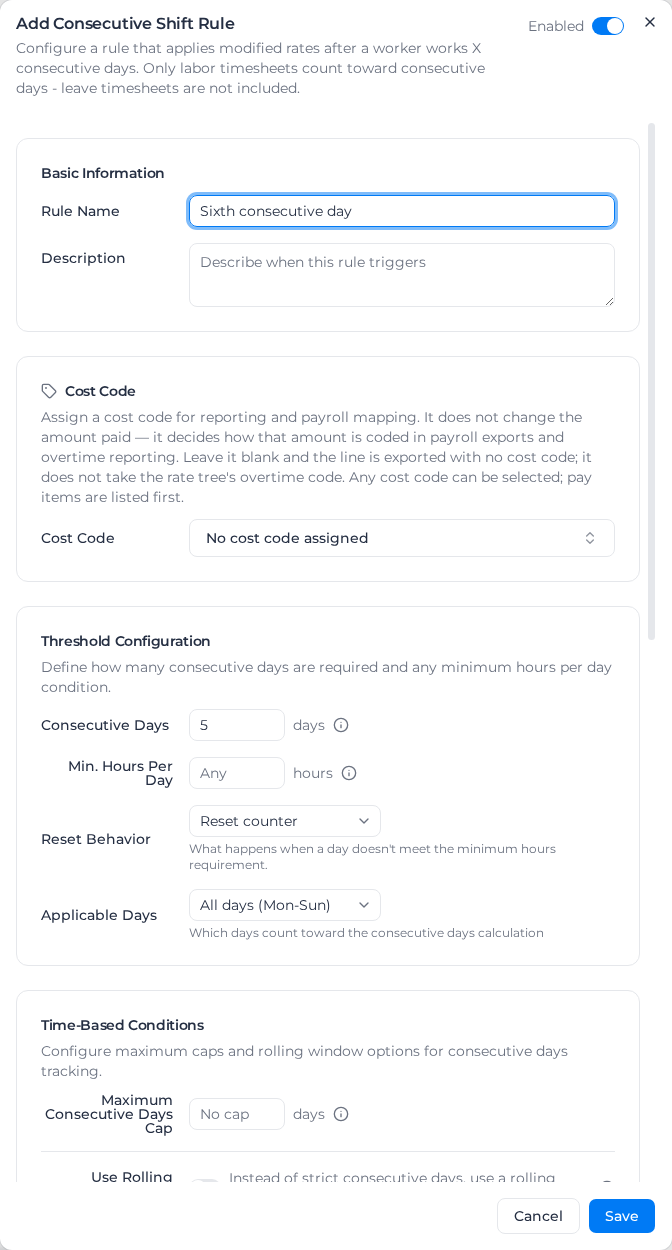
- Under Consecutive Shift Rules, select Add Consecutive Shift Rule.
- Leave Enabled on at the top of the dialog.
- Enter a Rule Name and optionally a Description.
- Choose a Cost Code for the premium line (see Cost code).
- Enter the Consecutive Days after which the premium starts. With 5, the sixth day in a row is the first one paid at the higher rate.
- Optionally set the rest of the threshold, the conditions and the rate modifiers (below).
- Under Rate Modification, choose the Rate Type, Multiplier or Fixed Rate, and enter the value, such as a Multiplier Value of 1.5.
- Select Save.
To change or remove a rule, open its menu and select Edit or Delete.
Which days count
- Min. Hours Per Day: the hours a day needs to count, so a one-hour call-out doesn't. Leave it at Any to count every day worked.
- Reset Behavior: what a day below that minimum does. Reset counter starts the run again; Skip day (keep streak) ignores the day and carries on.
- Applicable Days: All days (Mon-Sun) or Weekdays only (Mon-Fri).
- Require Same Client and Require Same Project: days only count while the worker stays on the same client or project.
- Shift Start Time Filter: Any time (no filter), Shifts starting before or Shifts starting after a time. A day with no shift in the window doesn't count and breaks the run (unlike a short day under Skip day (keep streak), which leaves it intact), so a "night shifts after 18:00" rule counts nights only: five day shifts then a night shift is day 1, not day 6. A day with no recorded start time doesn't count either, and the rate details say how many days were left out for that. Days the rule never counts, such as weekends under Weekdays only (Mon-Fri), don't break the run.
Caps and rolling windows
- Maximum Consecutive Days Cap: once the run passes this many days, the premium stops and ordinary rates apply until the threshold is reached again. Leave it at No cap for no limit. The cap counts the same days the rule counts, so with a Shift Start Time Filter only qualifying shifts move the count toward it.
- Use Rolling Window: adds a Rolling Window Period and Minimum Days Worked in Window, such as 12 days worked in any 14. The rule then also needs that many days worked in the window before it pays.
Rate modifiers
- Use Graduated Multiplier: pay rising multipliers the longer the run goes, with a row per step (From Day, To Day, Multiplier). Days count from the threshold: the first day paid at the higher rate is day 1. Leave To Day empty for "and beyond".
- Capped Hours Per Day: only this many hours a day get the higher rate. Leave it at No cap for every hour.
- Overtime Hours Threshold: only hours after this many in the day get the higher rate. Leave it at All hours for every hour.
A Fixed Rate replaces the multiplier.
Cost code
The cost code doesn't change the amount, only how the premium line is coded in exports. With no cost code, the line is exported with none (shown as -), not with the classification's overtime code. In the weekly summary and calendar it still carries the rule's name. In an export, turn on the Shift Rule column (off by default) to tell these premium lines apart from other lines with no pay item.
Timesheets processed before this worked differently may show the overtime code on these lines until they are processed again. If your payroll system maps lines by cost code, give the rule a cost code before you re-apply pay rates.
Example
A rule with Consecutive Days 5 and a Multiplier Value of 1.5. A worker works Monday to Saturday. Monday to Friday (days 1 to 5) are paid normally. Saturday, day 6, is paid at 1.5 times the base rate.