

Public holiday loading
Set what a public holiday pays, as one combined line or as a base-rate line plus a separately coded loading line.
Each rule group has one public holiday rule: the multiplier paid for hours worked on a public holiday, such as 2.5 times the base rate. It can pay those hours as one line, or split them into a base-rate line and a loading line with its own cost code, for payroll systems that need the public holiday penalty as a separate item. Splitting doesn't change the total paid.
Public holidays are recognised from your public holiday calendars, or a timesheet's own public holiday setting.
Add or change the public holiday rule
- Open the pay rate document, select the Rule Groups tab, and find Public Holiday.
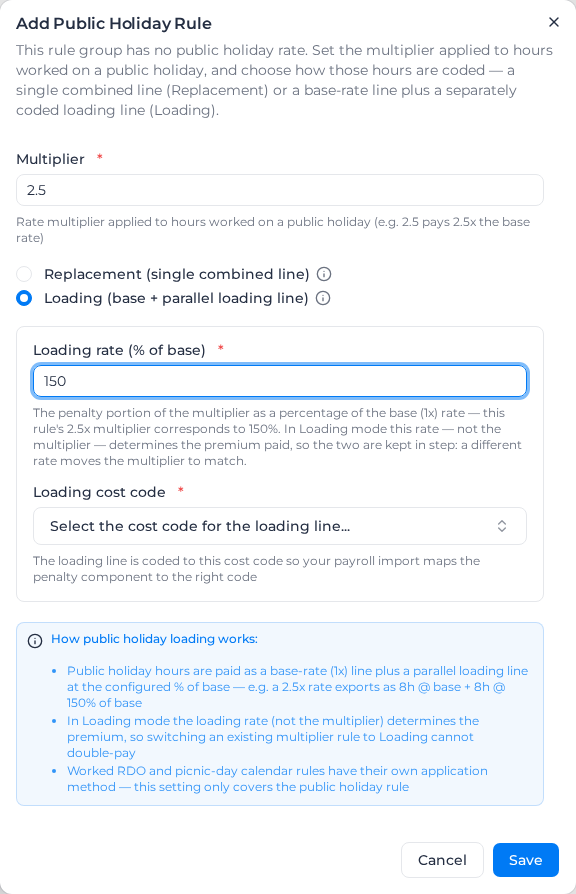
- If the group has no public holiday rule ("No public holiday rule configured"), select Add Rule and enter the Multiplier. Otherwise select Configure Loading beside the heading.
- Choose Replacement (single combined line) or Loading (base + parallel loading line).
- For Loading, enter the Loading rate (% of base) and choose the Loading cost code. Both are required.
- Select Save.
With Loading on, the section shows a "Loading 150%" badge. Switching back to Replacement (single combined line) clears the loading rate and cost code.
How Loading pays
The loading rate is the penalty part of the multiplier: (multiplier − 1) × 100. A 2.5x rate is a 150% loading; 2x is 100%.
- The base line is paid at 1x the base rate and keeps its public holiday cost code.
- The loading line is paid at the loading rate as a percentage of the same base, on the loading cost code.
- A line paid from a different base, such as a role's own rate, loads off that line's base.
The multiplier and loading rate are kept in step. Saving a different loading rate moves the multiplier to match, so a 125% loading makes the rule 2.25x, and the public holiday rate of every classification in the rule group changes with it; the save message says so. Changing the public holiday rate on the Rate Tree, or asking Milo to change the multiplier, moves the loading rate the same way, for every classification in the rule group. When you add a rule, each field fills in from the other as you type, and a pair that doesn't match is refused.
In Loading mode the loading rate, not the multiplier, sets what is paid. A rule saved before the two were kept in step can still hold a pair that disagrees, such as 2.25x beside 150%, which pays 2.5x on most hours. Open Configure Loading and select Save, or set the multiplier again, to bring them back in step.
Changing one classification's base rate doesn't change the rule, because every classification in the rule group shares it. That classification's public holiday rate moves with its new base.
Only the public holiday rule has a loading setting. Hours worked on RDO and picnic days, minimum engagement top-ups, RDO lines, consecutive shift and shift spacing premiums, time-of-day loaded hours and leave aren't split, and one loading line never gets a loading of its own.
Splitting doesn't change whether public holiday hours count toward overtime thresholds, or how they are reported as public holiday hours.
Example
Public holidays at 2.5x a $50 base, with the penalty coded to a public holiday loading code. A worker works 8 hours on a public holiday.
With Replacement (single combined line): one line, 8 hours at $125.00, $1,000.00.
With Loading (base + parallel loading line) at 150%:
- Public Holiday, 8 hours at $50.00: $400.00
- Public Holiday Loading (150%), 8 hours at $75.00: $600.00
The total is the same, and the hours are counted once.
With Replacement (single combined line), overtime hours on a public holiday stay on their overtime line, and the public holiday penalty is paid beside them on a public holiday line. If the same worker works 1.5 more hours at 1.5x overtime, those hours are paid 1.5 hours at $75.00 on the overtime line plus 1.5 hours at $75.00 on the public holiday line. Check this against your award or agreement.
These are also paid as their own line plus a public holiday line, and the timesheet's reasoning says which applied:
- hours paid at a role's or activity's own rate, rather than the base rate;
- hours priced by a custom activity rule, which chooses its own cost code;
- an overnight shift that runs into or out of a public holiday. Its public holiday hours get one public holiday line for the holiday side.
When an RDO accrual takes hours from a public holiday, the RDO line pays their base rate and their public holiday penalty stays on a public holiday line. Combined lines are reported as regular time, unless the public holiday cost code's category says otherwise. A labour burden item set to regular hours only applies to the base-rate part of a combined line, as it did when the base was its own line.
Worker pay items on a public holiday
A worker's pay item on the public holiday cost code is their full public holiday rate, not just the penalty. At $130.00 with a 2.5x rule, which is a $52.00 base:
- Ordinary hours are paid at $130.00 on the combined line.
- Overtime hours keep their overtime line, and their public holiday line is paid at $78.00, the $52.00 base × 1.5.
A worker's pay item on the ordinary cost code is their base rate. With no public holiday pay item, their combined line is paid at that rate × the multiplier, and the public holiday line beside overtime hours at that rate × (the multiplier − 1). If a classification uses its ordinary cost code as its public holiday cost code, a pay item on that code is the base rate too.
A public holiday pay item below the worker's base × the multiplier can't be a full public holiday rate, so it isn't applied. Such a pay item is usually set up as the penalty alone (such as $78.00 for this worker). The hours are paid at the worker's base × the multiplier instead, and the timesheet's reasoning says the pay item was not applied. Set the pay item to the full rate.
Choose a loading cost code with a description: exports take the line's cost code name from it. A change applies the next time pay rates are applied; apply pay rates again for timesheets already processed.