

Allowance rules
Pay allowances per hour, day, timesheet, week or fortnight, or price the allowances workers record on their timesheets.
An allowance rule pays an amount on top of a worker's rates, such as a site allowance, a height allowance or a tool allowance. It can add the allowance itself whenever its conditions are met, or put a rate on an allowance the worker has already recorded on their timesheet.
Allowance rules belong to a rule group: open the pay rate document, select the Rule Groups tab, and find Allowance Rules.
Add an allowance rule
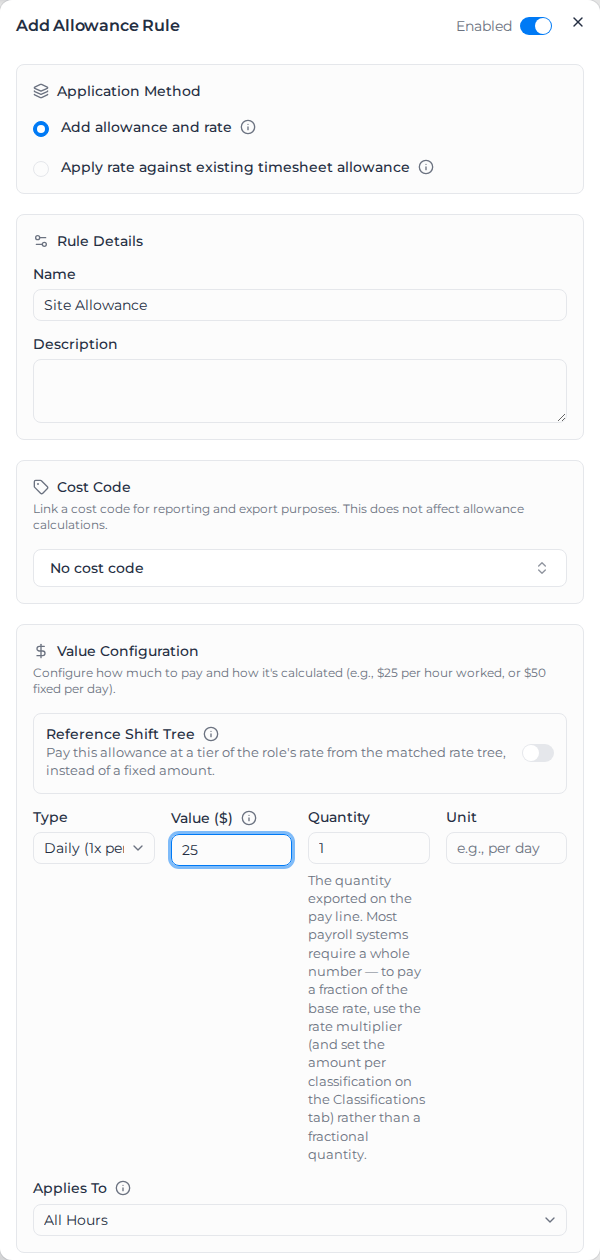
- Under Allowance Rules, select Add Allowance Rule.
- Leave Enabled on at the top of the dialog.
- Choose the Application Method (see Two ways to pay an allowance).
- Enter a Name and optionally a Description.
- Optionally choose a Cost Code. It decides how the allowance is coded in exports, not what it pays.
- Under Value Configuration, choose the Type and enter the Value ($), or turn on Reference Shift Tree (see Pay at a rate from the rate tree). Quantity is the quantity shown on the pay line; most payroll systems need a whole number. Unit is a label, such as "per day".
- Choose which hours the allowance Applies To: All Hours, Regular Time Only or Overtime Only.
- Optionally set the Leave Eligibility, Conditions and Advanced Conditions (below).
- Select Save.
The Allowance Rules list shows each rule's Name, Type, Value, Conditions and Cost Code. Its menu has Edit, Disable (to pause the rule without losing it) and Delete.
Allowance types
| Type | Paid |
|---|---|
| Hourly | For each hour that counts |
| Daily (1x per day) | Once a day |
| Per Timesheet | Once per timesheet |
| Weekly (1x per week) | Once in the payroll week |
| Fortnightly (1x per fortnight) | Once in the fortnight |
Two ways to pay an allowance
- Add allowance and rate: the rule adds the allowance, at its value, to every timesheet that meets its conditions. Use this when workers don't record allowances themselves.
- Apply rate against existing timesheet allowance: the rule pays an allowance the worker already recorded on the timesheet, such as one entered in Assignar Operations or picked from your allowance list. The rule's value is multiplied by the quantity recorded. The rule's Name is matched to the recorded allowance's name, ignoring capitals and the word "Allowance", so "Travel Allowance" matches "travel". A recorded allowance with no matching rule adds nothing to pay.
Conditions
Leave a condition empty to ignore it.
- Days of Week: only the ticked days.
- Minimum Hours: the worker must work at least this many hours across all their timesheets that day (or week, or fortnight, for those types).
- Maximum Hours: only when the day's (or period's) total is under this.
- Don't count leave or public holidays toward hour thresholds: appears once Minimum Hours or Maximum Hours is set. See Leave and public holidays in the hour thresholds.
- Start After Hours: for Hourly, only hours after this many count; for Daily and Per Timesheet, the allowance is paid once the hours pass it.
- Max Hours Per Day: for Hourly, the most hours the allowance pays in a day. See Cap the hours an hourly allowance pays.
- Employment Type Patterns: employment types to match, with
*as a wildcard:Full*matches Full Time. - Applies to Worked Hours Only: on by default, so minimum engagement top-up hours don't count.
Under Advanced Conditions:
- Time of Day: only hours inside Time Window Start to Time Window End. With Apply to Full Shift, every hour of a shift that overlaps the window counts.
- Public Holiday: Any Day, Public Holiday Only or Non-Public Holiday, from the worker's public holiday calendar and any per-timesheet setting.
- Shift Start Time Window: only shifts that start inside the window. A shift that starts before the window and runs into it doesn't qualify; use Time of Day for that. The window end isn't included, and overnight windows work.
- Overtime Threshold: Min Overtime Hours before the allowance applies.
- Consecutive Days: Min Consecutive Days worked, for a fatigue allowance.
- Repeating/Tiered: Repeat Every (hours) pays the allowance once for each block of hours worked that day, such as $10 per 4 hours. It replaces the type's normal calculation. The count uses total hours even when Applies To is set to Overtime Only.
- Role Name Patterns: role names to match, with
*as a wildcard. - Activity Filter: see below.
- Role Filtering: Include Roles limits the rule to those roles; Exclude Roles keeps it off them (and those days don't count toward consecutive days).
- Tags: Required Client Tags, Required Project Tags, Required Order Tags and Required Worker Tags. Every tag picked must be present. Under each one, Excluded Client Tags, Excluded Project Tags, Excluded Order Tags and Excluded Worker Tags do the opposite: any one of the tags picked keeps the allowance off the timesheet. See Leave some workers out by tag.
- Require ALL conditions (AND logic): on, every condition must match; off, any one is enough.
Filter by activity
The Activity Filter matches the activities the worker booked time against. Only activities set up in your account can be picked, and names match exactly: "Night Work" doesn't match "Night Work Setup". Choose a Filter mode:
- Exclude selected Activities (the default): the allowance applies to every activity except the ones picked.
- Include only selected Activities: the allowance applies only to the ones picked.
- Only when selected Activities are absent: the allowance is paid only when none of the picked activities was booked. You must pick at least one, or saving shows "Select at least one Activity that must be absent, or switch the filter mode to Exclude."
For an Hourly allowance, Exclude and Include decide which hours are paid. With Only when selected Activities are absent, once the allowance qualifies, every hour is paid.
Absent is not the same as Exclude. Under Exclude, a worker who books an excluded activity alongside other work still gets the allowance on the other work. Under Only when selected Activities are absent, booking any one of them cancels the allowance for the period. Use it for wording like "the site allowance is not payable in any week in which the worker performs wet-weather standby".
- Hourly and Per Timesheet rules check the timesheet they pay on. Daily, Weekly and Fortnightly rules check every timesheet the worker has in that day, week or fortnight, including ones outside the pay run you are processing.
- Unpaid activities and breaks the worker booked count. A break added by a break rule doesn't.
- A timesheet that arrives after the allowance was paid can't take it back by itself. Apply pay rates to the whole period again when late timesheets arrive.
- When the period couldn't be fully checked, the allowance carries a calculation warning saying what was missed.
Re-applying pay rates to a single timesheet still checks the rest of its day.
Older rules may still show Legacy activity name patterns, which match any activity whose name contains the text. Picking activities in the filter replaces them with exact matching.
Leave some workers out by tag
To pay an allowance to everyone except some workers, tag those workers and pick the tag under Excluded Worker Tags. The excluded tags for clients, projects and orders work the same way, for example to keep a travel allowance off jobs at one site.
- One matching tag is enough to leave the allowance off. Required tags are the other way round: every one must be present.
- An excluded tag always wins. It keeps the allowance off even when Require ALL conditions (AND logic) is off and another condition matches, and even when the timesheet also has a required tag.
- The timesheet's rate details say why, for example "Allowance "Daily Fares & Travel" not applied: worker has excluded tag "No Travel"." If the worker ticked that allowance in Operations, it isn't reported as an allowance no rule priced. On a Manual allowance the tick and the tag disagree, so the timesheet also gets a calculation warning to review.
- With an excluded client, project or order tag, the hours on the timesheets it leaves out don't count toward the allowance's Minimum Hours or Maximum Hours either, and those timesheets don't use up a daily, weekly or fortnightly allowance. Without Minimum Hours it's paid on the first timesheet of the day, week or fortnight that doesn't have the tag. With Minimum Hours, it's paid on the first timesheet without the tag at which the minimum is reached.
- The same goes for hours applied in an earlier run of the same week or fortnight, and for timesheets priced under another pay rate document: excluded ones don't count. Without Minimum Hours, a weekly or fortnightly allowance counts as already paid once an earlier run of that week or fortnight had a timesheet without the tag, so it isn't paid twice.
- A Manual allowance shows its excluded tags under Excluded tags, and is skipped the same way.
- If a tag is deleted after you exclude it, the rule shows it as Unknown or deleted tag. Remove it if you no longer need it.
- A change applies when you next apply pay rates.
This lets one rule group cover workers who get the allowance and workers who don't, instead of keeping a copy of the rule group without it.
Cap the hours an hourly allowance pays
Minimum Hours and Maximum Hours only decide whether an allowance applies. They never change how many hours an Hourly allowance pays. To limit the hours, set Max Hours Per Day. Leave it blank or 0 for no cap.
The cap counts all of the worker's timesheets that day that are paid under this rule. With a cap of 7.2, a worker with a 5-hour and a 3-hour timesheet on the same day is paid the allowance on 5 hours and then 2.2 hours.
- A day with fewer hours than the cap is paid on the hours worked, and each day starts again from zero.
- Quantity still multiplies the capped hours.
- A timesheet paid under a different rule group or pay rate document uses that document's allowance rule, so it doesn't count toward this cap.
- Apply pay rates to all of the day's timesheets together. If you apply them to one timesheet on its own, it is paid up to the full cap again.
- Max Hours Per Day is only offered on Hourly rules that use Add allowance and rate and don't use Repeat Every (hours). Changing the type or setting Repeat Every (hours) clears the cap, and changing the rule back doesn't restore it.
- The list shows the cap next to the rule's name, for example Max 7.2h/day, and the rate details note it on each line it reduced.
- A new or changed cap applies when you next apply pay rates. Timesheets already calculated keep their old amounts until you apply pay rates again.
A cap is not the same as "every hour except RDO accrual". An 8-hour day that accrues 0.8 hours of RDO still counts as 8 hours worked, so without a cap the allowance pays 8 hours. A cap of 7.2 only matches "hours worked less RDO accrual" when those two happen to be equal. For example, with an RDO rule that accrues 0.8 hours once a day reaches 7.2 hours:
- an 8-hour day pays the allowance on 7.2 hours (8 less 0.8);
- a 7.5-hour day also accrues 0.8 hours of RDO, but pays the allowance on 7.2 hours, not 6.7;
- a 7-hour day accrues no RDO and pays the allowance on all 7 hours.
Check which of the two your agreement means before you use a cap for it.
Weekly and fortnightly allowances
A Weekly or Fortnightly allowance is paid once in the period, on the first timesheet that brings the period's total into range:
- with Minimum Hours, on the timesheet where the period total reaches it;
- with Maximum Hours, only while the period total stays under it;
- with neither, on the first timesheet of the period.
The week is your payroll week. Fortnights follow your payroll cycle the same way as fortnightly overtime, with one difference: on a weekly cycle with no anchor date, each week is treated as the second week of a fortnight, so the previous week's hours always count. On that cycle, a fortnightly allowance with no hours conditions is only paid after a week with no hours. Set an anchor date on your payroll cycle to avoid this.
The first week of each fortnight starts from zero and the second week adds on to it. If the first week has no qualifying work, the allowance is paid in the second week instead. Each fortnight pays at most once, and on monthly and twice-monthly cycles the fortnights carry on across pay periods without restarting.
Leave and public holidays in the hour thresholds
By default, leave counts toward a weekly or fortnightly Minimum Hours and Maximum Hours, and automatic public holidays count toward every hours condition. A worker with 39 hours worked and 7.6 hours of unpaid leave has 46.6 hours, which meets a 45-hour weekly minimum.
Tick Don't count leave or public holidays toward hour thresholds when your agreement says leave doesn't count. The thresholds then leave out:
- every leave timesheet, paid or unpaid, whether it came from a leave request or was matched to a leave role;
- public holiday timesheets created automatically from the worker's holiday calendar.
Hours actually worked on a public holiday still count. With the box ticked, the worker above has 39 hours and doesn't get the allowance.
- It works on every allowance type, and on a day, week or fortnight however the leave is ordered within it.
- It is applied before an activity filter, so with both set the leave is never reported as hours the filter couldn't see.
- The rate details say how many hours were left out, for example "after excluding 7.60h of leave and public holidays not worked". This shows on each timesheet where leaving them out changed whether the allowance qualified and, for a daily, weekly or fortnightly allowance with Minimum Hours, in its own details when it is paid.
- Leave matched to a leave role in an earlier pay period still counts, because those timesheets can't be told apart from worked ones. That is the previous week of a fortnight, and, on monthly and twice-monthly cycles, days of the same week paid in the previous cycle. Automatic public holidays there are left out, and leave requests there never count. Where the rate details name leave that was left out, they also say how many hours from the previous period were counted as worked.
- If a timesheet under another pay rate document couldn't be checked for leave, its hours count as worked and a warning names them.
- With Pay on leave also on, an allowance with Minimum Hours is never paid on a leave timesheet. See below.
- The list shows hour thresholds excl. leave and public holidays next to the rule's hours.
- A change applies when you next apply pay rates. Timesheets already calculated keep their old amounts until you apply pay rates again.
Pay on leave
By default, allowances are only paid on worked timesheets. Under Leave Eligibility, turn on Pay on leave timesheets to also pay the allowance on leave, with the leave hours as its hours. Every allowance type offers it.
- Limit to leave types: pay only on some kinds of leave. Left at All leave types, any leave counts.
- Only pay on leave timesheets: pay the allowance on leave and never on worked timesheets. This covers both timesheets created from leave requests and timesheets matched to a leave role.
The dialog sums up which timesheets will get the allowance. The rule's other conditions (activity, role, time of day, employment type and so on) still apply on leave. Leave never contains overtime, so an allowance that needs overtime is never paid on leave, even when a leave rule counts leave toward the weekly overtime threshold.
With Don't count leave or public holidays toward hour thresholds also ticked, a leave timesheet's own hours don't count toward Minimum Hours or Maximum Hours, so a leave timesheet is never the one that reaches a minimum. An allowance with Minimum Hours is therefore never paid on a leave timesheet. A daily allowance looks at the leave timesheet on its own, so a 4-hour daily minimum isn't met by a 7.6-hour leave day, even if the worker also worked that day. An allowance with no hours conditions is still paid on leave.
Pay on leave timesheets only affects allowance rules. A worker's own rate for a pay item still applies on leave timesheets either way.
For example, a $25 Daily (1x per day) travel allowance with Pay on leave timesheets on and Limit to leave types set to RDO is paid on worked days and on RDOs, but not on annual or sick leave. Add Only pay on leave timesheets and it is paid on RDOs only.
Pay at a rate from the rate tree
Turn on Reference Shift Tree to pay the allowance at a tier of the classification's own rate on the matched rate tree, chosen under Rate tier, instead of a fixed amount.
Stop two allowances being paid together
Suppresses other allowances appears on a rule when the rule group has other allowances. Pick the allowances this one replaces: when this allowance is paid on a timesheet, those aren't. Use it for "paid in lieu of" clauses.
For "only one of these applies", use Exclusion groups below the list:
- Select Add group and name it.
- Add at least two allowances with Add allowance....
- Drag them into priority order, most preferred first.
On each timesheet, the first member in priority order that is actually paid wins, and the others aren't paid. The order decides, not the amount. An allowance can be in one exclusion group, and a member of a group can't also suppress allowances directly.
Both work only within the rule group, and are worked out per timesheet:
- An allowance only suppresses others when it is actually paid on that timesheet, not merely when it qualifies. The one exception is an Hourly allowance whose Max Hours Per Day was used up by the worker's earlier timesheets that day: it was paid that day, so it still suppresses on the later ones.
- Both can stop allowances recorded on the timesheet, such as ones entered in Assignar Operations, as well as ones the rules add.
A suppressed allowance doesn't show as a $0 line. The timesheet's rate details say why it wasn't paid.
Examples
Early start allowance. Daily (1x per day), $20, Shift Start Time Window 04:00 to 06:00. A shift starting at 4:30 am gets $20; one starting at 6:30 am doesn't, even if it has early hours.
Weekly allowance withheld for standby. Weekly (1x per week), $45, Only when selected Activities are absent with Wet Weather Standby picked. A worker who books no standby that week gets $45. One who books an hour of standby, even on Thursday after a Monday timesheet, gets nothing.
Allowance on ordinary hours only. Hourly, $9.75, Max Hours Per Day 7.2. An 8-hour day is paid $70.20 (7.2 hours) instead of $78.00. A 7-hour day is paid on all 7 hours.
Travel for everyone except some workers. Daily (1x per day), $25, Excluded Worker Tags set to No Travel. Workers tagged No Travel get nothing; everyone else gets $25 a day.
One site allowance only. Remote Site ($50), Metro Site ($30) and Base Site ($15) in an exclusion group in that order. If Remote applies, only Remote is paid; if it doesn't but Metro does, only Metro is paid.