

Export an evidence pack
Download one worker's credentials and certificates as a ZIP file with a PDF summary, ready to send to a client or head contractor.
Head contractors often ask for proof of a worker's tickets before they start on site. An evidence pack is a ZIP file with a PDF summary of the worker's credentials and a copy of every certificate you choose. Owners and Admins can export one.
Export a worker's pack
- Open the worker's Roles & Competencies tab: Resources → Users → Worker Profiles, select the worker, then Roles & Competencies.
- Select Export Evidence Package.
- Tick the credentials to include, or select Select all. Each credential is listed by its licence or reference number, with its expiry date and how many files it has. Revoked, archived and replaced credentials are left out, but expired ones are listed, so check the dates. Nothing is ticked when the dialog opens.
- Select Generate Package.
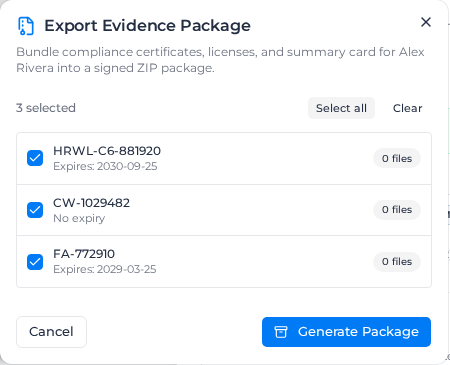
While the pack is built, the dialog shows "Assembling compliance package...". When it reads Evidence Package Ready, with the number of files and the size, select Download Archive.
If it shows "Failed to generate evidence package", close the dialog and generate it again.
What is in the ZIP file
The file is named after the worker and the day you download it, for example worker-compliance-alex-rivera-2026-09-26.zip. Inside:
- compliance-summary.pdf: an evidence summary with the worker's name and worker ID, the date it was generated, and a table of the included credentials (competency, issuer, licence number, issue and expiry dates, verification) and their files.
- evidence: a folder with a copy of each certificate file. Documents on a competency marked Sensitive, such as a medical, are left out unless you have See sensitive worker data. Sensitive notes are never included.
- manifest.json: a record of the pack and a checksum for every file, so the recipient can check that nothing was changed.
The summary lists what was recorded. It does not say whether the worker meets a particular role; the PDF notes that verification describes the review state only.
Download within 24 hours
A generated pack is kept for 24 hours. After that, Download Archive fails with "Export package has expired"; generate a new one.