

Review linked results
See the workpacks and Field responses tied to a project or an order, filter them by status, and jump from one to its photos.
The Linked results tab, beside Photos on a project or an order, lists the records that photos come out of: the workpacks and the Field responses tied to that project or order.
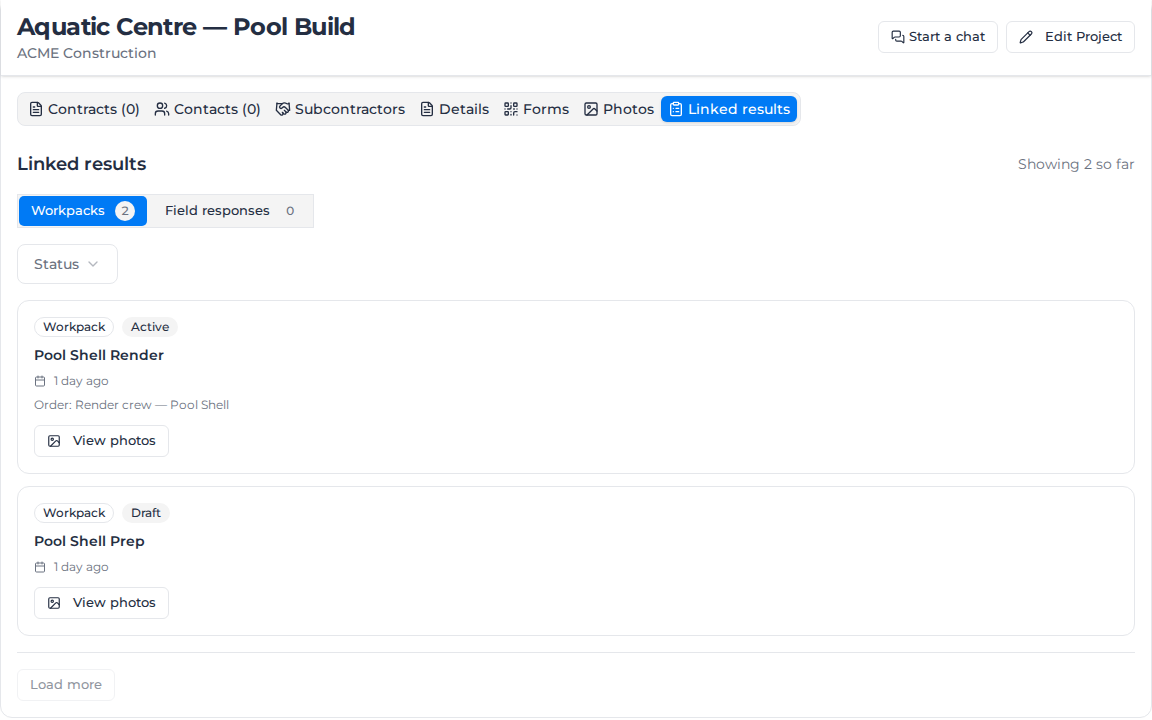
What appears here
- A workpack appears on a project when it belongs to that project, or when one of its activities is on one of the project's orders. It appears on an order when at least one of its activities is on that order.
- A Field response appears once someone submits a form whose answers name this project or order (or, on a project, one of its orders), or a response raised from a workpack activity that belongs here.
Attaching a form to a workpack activity adds nothing here until someone fills it in. Change the project or order in a response's answers and its card moves to the project or order it now names.
Switch between workpacks and Field responses
Select Workpacks or Field responses above the list. The tab opens on Workpacks. The number on each button is the total for that kind under its own status filter; no number means the total could not be loaded.
Showing 50 so far beside the heading counts the rows loaded. Rows load 50 at a time; click Load more for the next 50. It greys out at the end of the list. The list is always newest first, with no search, date filter or sort.
Filter by status
Use Status above the list. It filters only the kind on screen, and each kind keeps its own selection when you switch between them.
- Workpacks: Draft, Submitted, Active, Re-approval pending, Rejected, Closed and Archived.
- Field responses: Draft, Active and Archived. A response that is both a draft and archived is shown and filtered as Draft.
Read a card
Each card shows the kind and status, the title, and how long ago it was last active: for a workpack, when it was submitted, or created if not yet submitted; for a Field response, when it was last saved.
- A workpack card is titled with the workpack's name; select it to open the workpack.
- A Field response card is titled with the form's name, so responses to the same form look alike apart from their time.
- Project: and Order: lines link to the records the result belongs to. The line for the page you are on is left out, and a line only shows when you can open that record.
A workpack whose activities span several orders shows one Order: line, not one per order.
On a project, a workpack that arrived through one of the project's orders names its own project on the Project: line, which can be a different project. A Field response tied to more than one project names only one of them, not necessarily the one you're on.
See a record's photos
Click View photos on a card. The Photos tab opens, narrowed to that record, under a banner reading Showing photos from and the record's name. Click Show all photos or Reset filters to see the whole gallery again.
A workpack's photos are the files attached to the workpack itself. Photos in a Field response raised from one of its activities are under that response's own card. When a record has no photos, the gallery reads No photos from and its name.
The address does not change, so the browser's back button does not undo it and the narrowed gallery cannot be bookmarked. For searching inside it, see Find photos.
When the list is not what you expect
- No linked workpacks or No linked Field responses shows both when there are none and when the Status filter hides them all. Check Status first.
- Failed to load results with Try Again: the list could not load. Try Again carries on from where it stopped.
- A workpack created or a form submitted in the last few minutes may not show yet. The list can be up to five minutes old; reload the page to update it.
Leaving the tab resets it to Workpacks with no status filter.