

Usage and billing
How Connect runs are counted, your monthly allowance, buying more runs, and what happens when the balance runs out
Connect counts runs. Each time a published workflow fires is one run, whether it succeeds or fails and however many steps it has. Test runs in the builder are free.
An event a trigger's filters leave out never starts a run, so filtering triggers to the client, project or status change you care about is the simplest way to use fewer.
Check your balance
Select Usage & billing in the Connect toolbar. It opens Billing on the Assignar Connect tab.
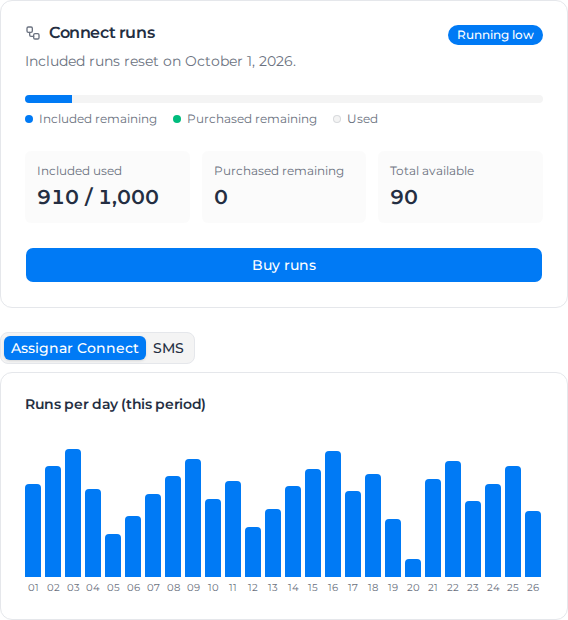
The Connect runs card shows:
- Included used: runs used from this month's allowance, for example 910 / 1,000.
- Purchased remaining: runs you have bought and not yet used.
- Total available: what is left overall.
- A status: Active, Running low or Paused, and the date the included runs reset.
Below it, Runs per day (this period) shows which days were busy, and Recent purchases & adjustments lists what has been bought or added.
Your organization's monthly allowance is 1,000 runs unless Assignar has set a different one for you. It resets at the start of each calendar month, and unused included runs do not carry over. Purchased runs are used only once the monthly allowance is gone, and they never expire.
Buy more runs
- On the Connect runs card, select Buy runs.
- Choose a pack of 1,000, 5,000 or 25,000 runs, or enter a Custom amount between 100 and 100,000. Larger packs cost less per run, and a custom amount is priced at the matching pack's rate.
- Select Continue to payment and pay by card on the secure checkout page.
The runs are added to your balance a few seconds after payment. If your workflows had been paused for lack of runs, they switch back on by themselves. If the balance still hasn't changed after you refresh the page, contact Assignar support with your payment receipt.
Top-ups are sold in Australia, New Zealand, the United States and Canada. In other regions the card says "Top-ups are not available in your region yet - contact support to add runs."
When the balance runs low
When the balance drops to a fifth of your monthly allowance, a banner appears above the builder and your Owners, Admins and Managers get a notification.

When the balance reaches zero:
- Every workflow that is switched on is paused, and the banner reads Workflows paused — run allowance used up.
- The notification says "Connect workflows are paused — the run allowance is used up. Buy runs to resume them automatically."
- Your workflows, connections and history are kept as they were.
Paused workflows switch back on by themselves after you buy runs, or after the monthly reset. Workflows you had switched off yourself stay off.
If your organization keeps running out
First, filter your triggers so workflows only run on events that matter; Fix workflow problems has examples. If you genuinely need a bigger allowance every month, contact Assignar support: allowances can be changed per organization, and a large one-off purchase can be invoiced to you directly.