

SMS Opt-In & Consent
How end users opt in to receive SMS messages through Assignar Pay
1. Program Overview
Assignar Pay is a software-as-a-service application used by construction companies to coordinate their workforce. When a company enables SMS through Assignar Pay, the Service sends operational text messages — such as shift assignments, schedule changes, site updates, and broadcasts from administrators — to the mobile numbers of that company's workers, on the company's behalf. These messages are operational in nature and are not marketing communications from Assignar Pay.
Brand: Assignar Pay (operated by Assignar).
Sender: A regional 10DLC number (United States, Australia, or Canada) provisioned to each enabled team account.
2. How End Users Opt In
End users opt in inside the authenticated Assignar Pay web application at https://pay.assignar.com:
- The user signs into their Assignar Pay account.
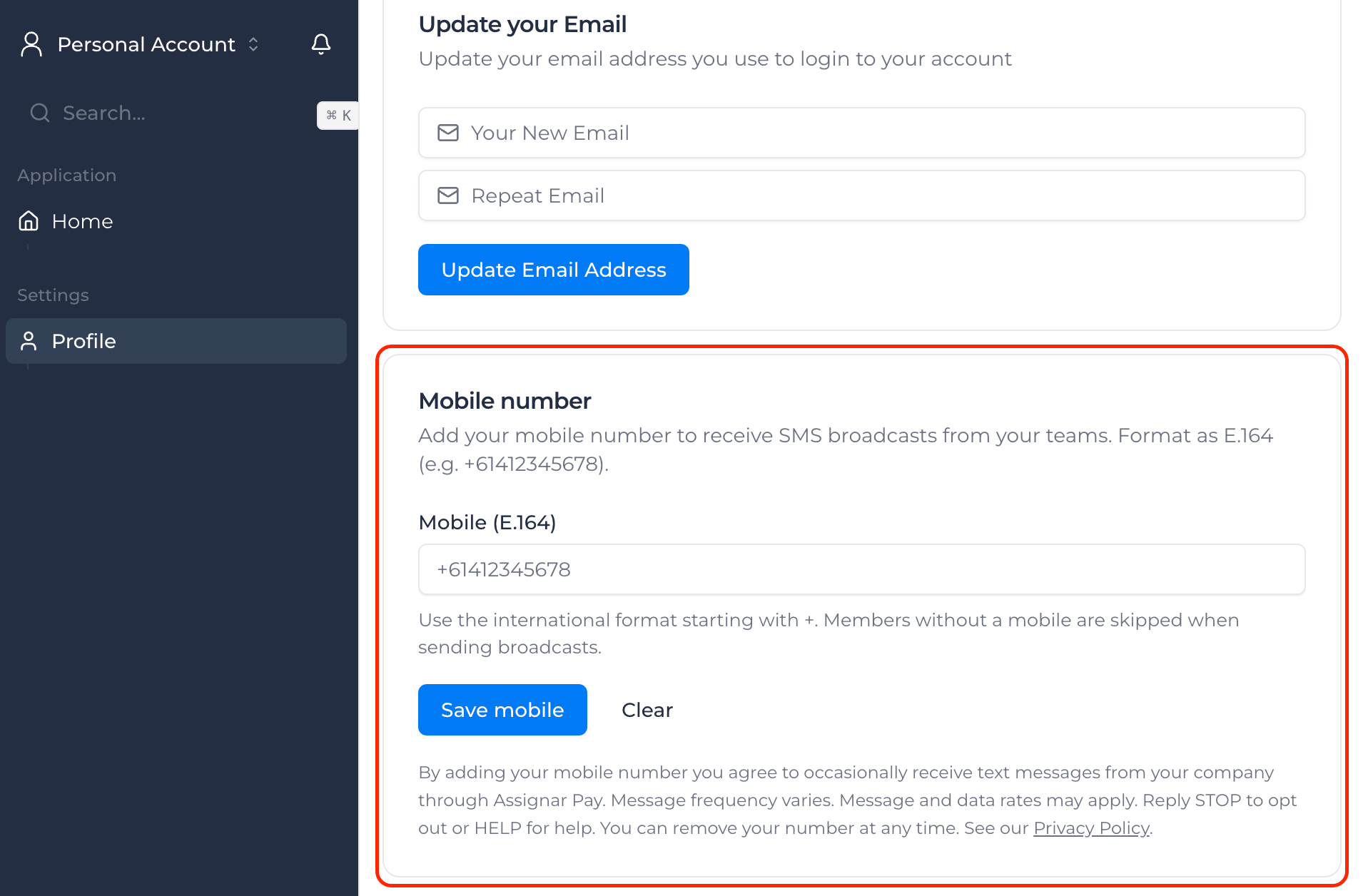
- The user navigates to their profile and locates the Mobile number section. The mobile number field is optional — the user is not required to provide it.
- The user enters their mobile number in international format (for example,
+15555550123). - Two consent checkboxes are displayed directly beneath the input (see §3 and the screenshot in §4). Neither checkbox is required to save the form. The user can submit their mobile number with neither, one, or both ticked.
- Checkbox 1 — consent to receive operational SMS from their company through Assignar Pay (with frequency, rate, and STOP/HELP disclosures).
- Checkbox 2 — acceptance of the Terms of Service & Privacy Policy (both linked inside the checkbox label).
- The user clicks Save mobile. The Save button is enabled regardless of checkbox state — ticking the boxes is the affirmative act that records express SMS consent (the system writes
accounts.sms_opt_in_at), not a precondition for saving the number. Saving with one or neither box ticked stores the number on file but does NOT opt the user in — the broadcast dispatcher will not send to them. - The user can opt out at any time by either (a) un-ticking the boxes and clicking Save again (consent is withdrawn, the number stays on file), (b) clearing the mobile number entirely, or (c) replying STOP to any received SMS.
Alternative opt-in: An end user can also opt in by texting START to the sender number their company has been provisioned.
3. Consent Disclosures Shown at Opt-In
The two checkbox labels below are rendered verbatim on the profile form, immediately beneath the mobile number input. The user is free to leave either or both unchecked — ticking is what records express consent, not a gate on form submission.
Checkbox 1 — SMS consent:
By checking, I agree to receive operational text messages from my company through Assignar Pay (shift assignments, schedule changes, site updates, broadcasts). Message frequency varies. Message and data rates may apply. Reply STOP to opt out or HELP for help.
Checkbox 2 — Terms & Privacy:
By checking, I accept the Terms of Service & Privacy Policy.
4. Screenshot of the Opt-In Form
The screenshot below shows the in-app profile mobile number form. The phone number field is optional, both consent checkboxes (with their full disclosure text and the Terms of Service & Privacy Policy links) are visible beneath it, and the Save button is enabled regardless of checkbox state — ticking the boxes is what records consent, not a precondition for saving the number.
5. Required Disclosures
- Brand: Assignar Pay
- Program: Operational SMS notifications sent by a user's company through Assignar Pay (shift assignments, schedule changes, site updates, broadcasts).
- Message frequency: Varies based on the company's use of the Service.
- Charges: Message and data rates may apply, based on the recipient's mobile plan and carrier.
- Opt-out: Reply STOP to any received message to opt out at the carrier level, or remove your mobile number from your profile settings at any time.
- Help: Reply HELP to any received message for support contact information.
- Replies to START, STOP, and HELP are free of charge to the recipient.
6. Mobile Information Privacy
No mobile information will be shared with third parties or affiliates for marketing or promotional purposes at any time. Mobile information, opt-in data, and consent obtained through our SMS program are never shared or sold to third parties, affiliates, or lead generators. Mobile/SMS data is shared only with the service providers strictly necessary to deliver your company's messages (for example, the telecommunications carrier delivering the message), and where required by law.
7. How End Users Opt Out
- Remove your mobile number from your Assignar Pay profile settings; or
- Reply STOP to any received text message to opt out at the carrier level.
Opting out stops all further SMS messages from the Service to that mobile number (except a final confirmation, where required by the carrier).
8. Related Policies
- Privacy Policy — section 15 covers SMS Messaging & Consent in detail.
- Terms of Service — section 12 covers SMS Messaging & Consent.
9. Contact
Questions about the SMS program can be sent to privacy@assignar.com.
Last Updated: June 2, 2026